Compare a simple Internet connection without a DMZ to one with a DMZ. Which servers go where?
Without a DMZ, everything is "Internet → Firewall → Intranet" — but if you host any public service, that server has to be in the Intranet, which is risky. With a DMZ, public servers live in their own segment isolated from the Intranet.
Which servers go where (the direct answer):
The rule is simple — a server's placement follows who needs to reach it:
| Server / service | Goes in… | Why |
|---|---|---|
| Web server (public site) | DMZ | Reachable from the Internet |
| Reverse proxy / load balancer | DMZ | Fronts the Internet |
| Mail relay (inbound MX / outbound smarthost) | DMZ | Talks to the public Internet |
| Public/authoritative DNS | DMZ | Queried from outside |
| Database server | Intranet (internal) | Only the app tier needs it — never the public |
| File server / NAS | Intranet (internal) | Internal-only data |
| Directory / Active Directory / LDAP | Intranet (internal) | Identity store — must never face the Internet |
| Internal business apps (ERP, intranet portal) | Intranet (internal) | Used by staff, not the public |
| Employee workstations | Intranet (internal) | Client devices |
The one-line test: if something outside the company must connect to it, it belongs in the DMZ (public-facing: web, mail relay, reverse proxy, public DNS). If only internal users or internal systems connect to it, it belongs in the internal network / Intranet (databases, file servers, directory/AD, internal apps). A public web server in the DMZ that needs data reaches back in to the internal database through a single, tightly-scoped firewall rule — the database itself never sits in the DMZ.
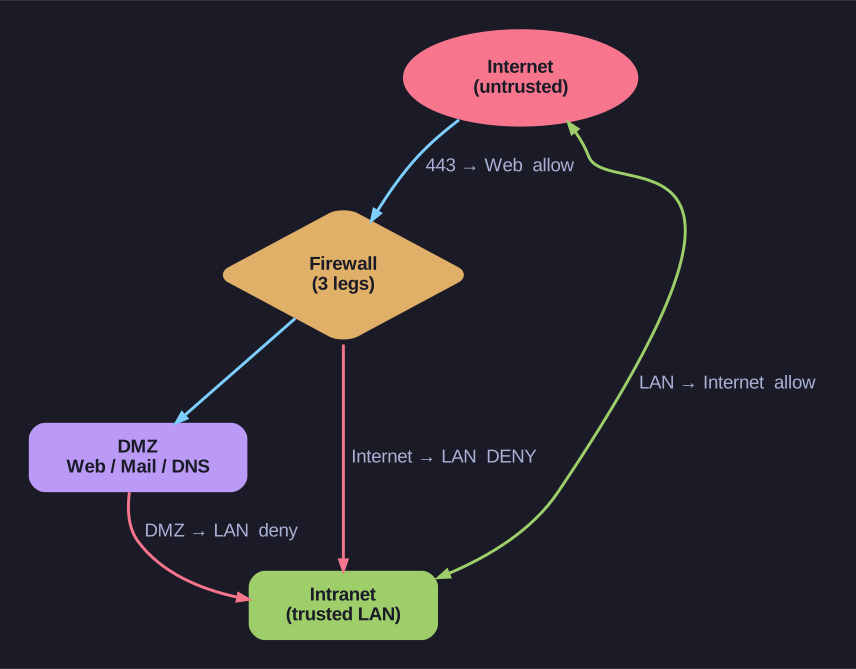
* Three-legged DMZ traffic-flow: allowed vs denied directions. *
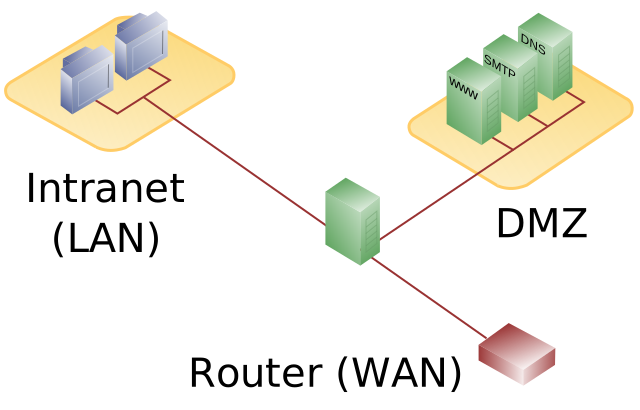
* Single-firewall (three-legged) DMZ separating public servers from the LAN. — Pbroks13, Public domain, via Wikimedia Commons. *
Without DMZ:
[Internet] ──→ [Border Router] ──→ [Firewall] ──→ [Intranet]
                                                      ↑
                                                  Web server here?
                                                  → Bad: if hacked, attacker is INSIDE
This works only if you're purely a consumer of internet services — no incoming traffic from the Internet. The moment you host a public web server or email server, you have a problem.
With DMZ:
                        [Web Server]
                             ↑
                          [DMZ]
                             ↑
[Internet] ──→ [Border Router] ──→ [Firewall] ──→ [Intranet]
The web server is on the DMZ leg of the firewall. Three-zone routing:
| Direction | Allowed? |
|---|---|
| Internet → DMZ (port 443 to web server) |  Allow Allow |
| Internet → Intranet |  Deny Deny |
| DMZ → Intranet | Deny (or very tight: only specific app traffic) |
| Intranet → Internet | Allow |
| Intranet → DMZ (admin SSH) | Allow (restricted) |
The compromise scenario:
Attacker compromises the web server:
| Architecture | What attacker can do next |
|---|---|
| No DMZ (web server in Intranet) | Pivot to file servers, AD, workstations directly |
| With DMZ | Confined to DMZ. Must compromise the inner path (DMZ → Intranet) which is highly restricted |
The "Border Router" question:
Standard enterprise diagrams include a Border Router between Internet and Firewall. Why?
- The router connects you to your ISP (BGP, MPLS, etc.).
- The firewall handles security policy.
- Separating them means the FW can be replaced without changing routing config.
- The router can also do first-pass filtering (drop obvious garbage like RFC1918 traffic from the Internet).
Tip: SOHO routers ("plug-and-play" home routers) usually combine border router + firewall + WiFi AP + switch into one box. Fine for home use; absolutely not for enterprise. Enterprise designs separate every function so each can be hardened, monitored, and replaced independently.
Go deeper:
 NIST SP 800-41 Rev. 1 — Guidelines on Firewalls — recommends placing public servers in a DMZ rather than the internal network.