During WebAuthn login, how is the challenge handled, and what is allowCredentials?
The browser calls navigator.credentials.get, the authenticator signs the server's challenge with the private key, and allowCredentials tells the browser which credential ID(s) the server expects to be used.
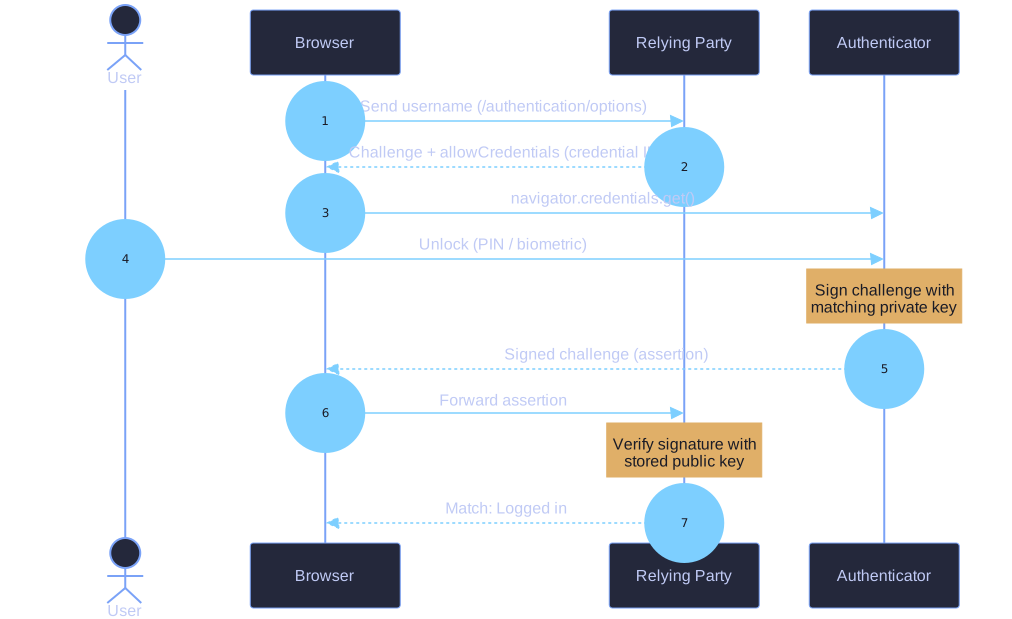
* WebAuthn login: allowCredentials names the key; the signed challenge is verified. *
The login sequence (navigator.credentials.get):
- Browser sends the username to the relying party (
/authentication/options). - Relying party responds with a challenge and an
allowCredentialslist — the credential ID(s) registered to that user, telling the authenticator which key to use. - User unlocks the authenticator (PIN/biometric).
- Authenticator signs the challenge with the matching private key and returns the signed challenge (an assertion).
- Relying party verifies the signature with the public key it stored at registration. Match ⇒ "Logged in."
The credential ID in allowCredentials is the same ID created during registration — you can confirm this by comparing the traffic, proving login uses the very key pair set up at sign-up.
Tip: Registration uses navigator.credentials.**create** (make a new key); login uses navigator.credentials.**get** (use an existing key). Same challenge-response idea, opposite direction of the key's life cycle.