Quiz Entry - updated: 2026.07.30
How are 2.4 GHz and 5 GHz channels organized, and which channels should you use to avoid interference?
The 2.4 GHz band has 11 usable channels (US) but only 3 non-overlapping: 1, 6, and 11. The 5 GHz band has 24+ non-overlapping channels. Always use non-overlapping channels for adjacent APs.
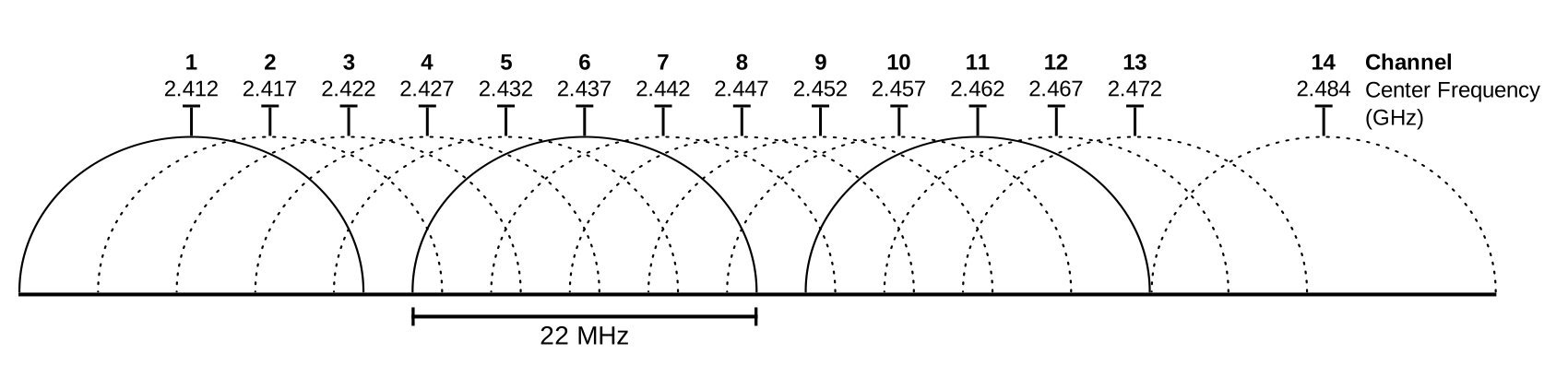
* 2.4 GHz spectrum: non-overlapping channels 1, 6, 11. — Michael Gauthier, CC BY-SA 3.0, via Wikimedia Commons. *
2.4 GHz channel layout:
- Each channel is allocated 22 MHz bandwidth
- Channels are separated by only 5 MHz — so adjacent channels overlap!
- Non-overlapping channels: 1, 6, and 11 (the only three that don't interfere with each other)
- With only 3 non-overlapping channels, dense deployments with many APs cause co-channel interference
5 GHz channel layout:
- 24 non-overlapping channels available (each 20 MHz wide, separated by 20 MHz)
- Examples: channels 36, 40, 44, 48, 52, 56, 60, 64, 100, 104, ...
- Much more spectrum available → less interference between APs
WLAN deployment planning factors:
- Geographical layout of the facility
- Number of users and devices per area
- Expected data rates
- Use of non-overlapping channels across adjacent APs
- Transmit power settings (lower power = smaller cell = more APs needed but less overlap)
Tip: In a multi-AP deployment, assign channels 1, 6, and 11 in a honeycomb pattern so no two adjacent APs use the same channel. With 5 GHz, you have many more channels to work with.
Go deeper:
 List of WLAN channels (Wikipedia) — channel/frequency tables plus the non-overlapping 1/6/11 overlap diagram.