Quiz Entry - updated: 2026.07.30
How are structs laid out in memory, and what is padding?
Members sit in declaration order, but the compiler inserts padding so each is on its natural alignment boundary — which is why {char; int; char} takes 12 bytes, not 6.
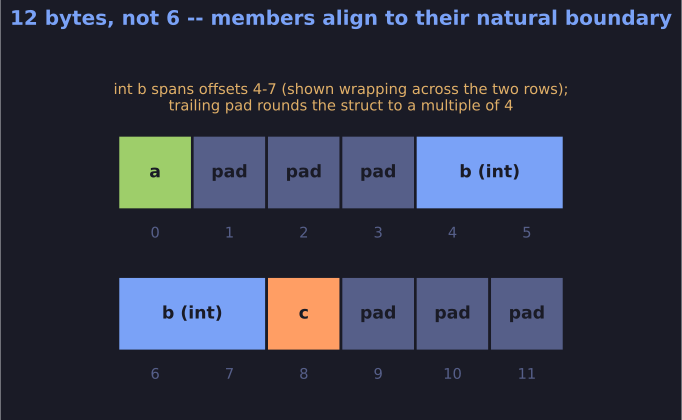
* {char; int; char} needs 12 bytes: 3 pad bytes push int to a 4-byte boundary, and 3 trailing pad bytes round the struct up. *
Basic layout:
struct example {
    // 1 byte
    char a;
    // 4 bytes
    int b;
    // 1 byte
    char c;
};
Memory layout (with padding):
| a | pad | pad | pad | b | b | b | b | c | pad | pad | pad |
 0    1     2     3    4   5   6   7   8   9    10    11
Total: 12 bytes (not 6!)
Alignment rules:
- Each member aligned to its natural boundary (int → 4-byte boundary)
- Struct size is multiple of largest member's alignment
- Padding inserted between members and at end as needed
Why padding exists:
- CPUs access memory faster when data is aligned
- Misaligned access may be slow or cause exceptions
- Critical for arrays of structs (each element must be aligned)
Calculating member addresses:
addr(member_k) = base + Σ(size_i + padding_i) for i < k
Practical example:
struct S2 {
    // 8 bytes @ offset 0
    double v;
    // 8 bytes @ offset 8
    int i[2];
    // 1 byte  @ offset 16
    char c;
// Total: 24 bytes (7 bytes padding at end for double alignment)
};
Tip: Order members largest-to-smallest to minimize padding:
// Bad: 12 bytes with padding
struct { char a; int b; char c; };

// Good: 8 bytes, minimal padding
struct { int b; char a; char c; };
Go deeper:
 Data structure alignment — Wikipedia — alignment rules, padding, and
 #pragma pack.