How do you build a group out of other groups in an INI inventory, and how do you check the result?
Add a section named [parent:children] and list group names (not hosts) in it; ansible-navigator inventory -i inventory -m stdout --graph parent then draws the resulting tree.
[raleigh]
servera.lab.example.com
serverb.lab.example.com

[mountainview]
serverc.lab.example.com

[us:children]
raleigh
mountainview
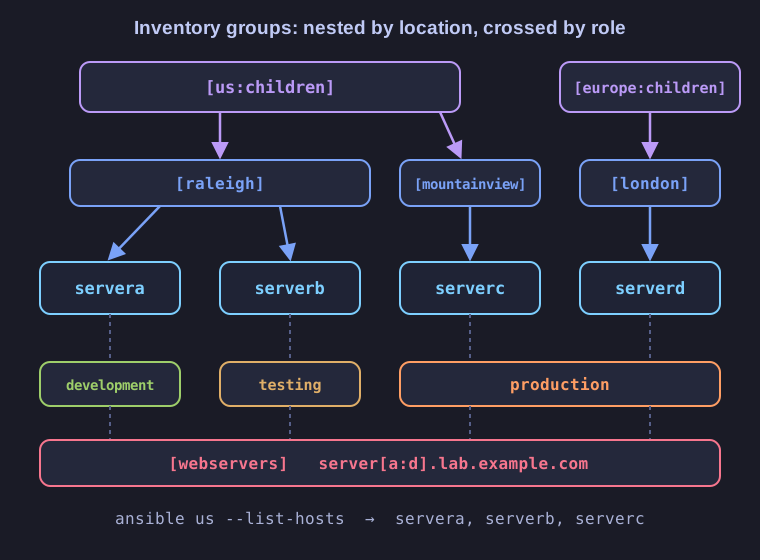
* Child groups nest by location, while webservers and production cut across the same four hosts. *
The :children suffix tells Ansible that the lines below are group names. The parent group us contains every host of its children, so ansible us --list-hosts returns three hosts: servera, serverb and serverc. Add a host to raleigh and it automatically becomes part of us too, which is why nested groups beat repeating hostnames.
To see the hierarchy, ansible-navigator inventory -i inventory -m stdout --graph us prints:
@us:
  |--@mountainview:
  |  |--serverc.lab.example.com
  |--@raleigh:
  |  |--servera.lab.example.com
  |  |--serverb.lab.example.com
A @ marks a group. Without -m stdout, ansible-navigator opens its interactive text UI instead, where :0 browses groups, :1 browses hosts and :q quits.
Go deeper:
 Grouping groups: parent/child relationships (official docs) — the
 :childrensyntax in INI andchildren:in YAML.- Ansible Navigator documentation — the
inventorysubcommand, stdout vs interactive mode.