Quiz Entry - updated: 2026.07.30
How do you chain multiple pipes for complex data processing?
Each | hands its output to the next stage, so a long chain transforms data step by step — filter, extract, sort, count, rank.
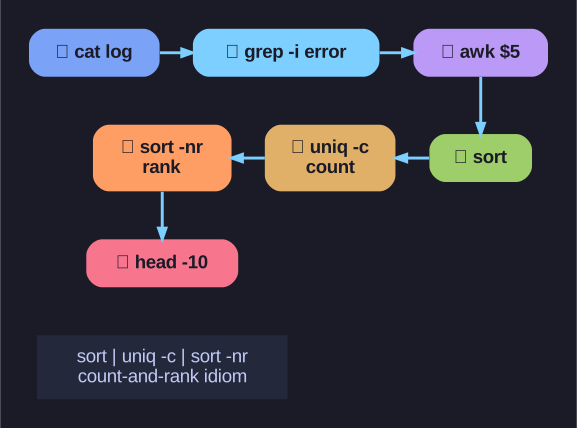
* The canonical count-and-rank pipeline, stage by stage. *
A pipeline reads left to right as a recipe. This one answers "which services log the most errors?":
# Read the system log
cat /var/log/syslog |
# Search for lines with "error"
grep -i "error" |
# Extract 5th word (service name)
awk '{print $5}' |
# Sort service names alphabetically
sort |
# Count occurrences
uniq -c |
# Sort by count (descending)
sort -nr |
# Show top 10 most frequent
head -n 10
As a one-liner:
sudo cat /var/log/syslog | grep -i "error" | awk '{print $5}' | sort | uniq -c | sort -nr | head -n 10
This pipeline:
- Reads the log file
grep -i "error"keeps only lines mentioning "error" (-i= case-insensitive)awk '{print $5}'prints the 5th whitespace-separated field (the service name)sort | uniq -cgroups identical names and counts each —uniq -conly collapses adjacent duplicates, so you mustsortfirst, or the counts will be wrongsort -nrre-sorts by that count, numerically (-n) and descending (-r)head -n 10keeps the top 10 offenders
Why this pattern is everywhere: sort | uniq -c | sort -nr is the canonical "count and rank" idiom in shell. Memorize it and you can tally anything — IPs in an access log, file extensions, repeated commands.
Go deeper:
 Pipeline (Unix) — Wikipedia — how multi-stage pipelines stream data left-to-right between concurrent processes.