Quiz Entry - updated: 2026.07.30
How do you configure both interfaces on a router connecting two networks?
Configure each interface separately — enter it, set its description, IPv4 + IPv6 address, and no shutdown — repeating the same five-command pattern once per interface (e.g. G0/0/0 for the LAN, G0/0/1 for the link to R2).
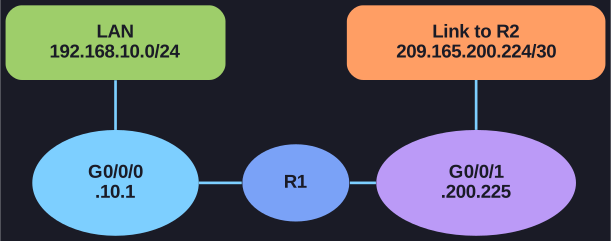
* One router, two interfaces, two networks: each interface sits in a different subnet and is configured independently. *
Example: Configuring R1 with Two Interfaces
Interface G0/0/0 (LAN side - 192.168.10.0/24):
R1(config)# interface gigabitEthernet 0/0/0
R1(config-if)# description Link to LAN
R1(config-if)# ip address 192.168.10.1 255.255.255.0
R1(config-if)# ipv6 address 2001:db8:acad:10::1/64
R1(config-if)# no shutdown
R1(config-if)# exit
Interface G0/0/1 (WAN side - 209.165.200.224/30):
R1(config)# interface gigabitEthernet 0/0/1
R1(config-if)# description Link to R2
R1(config-if)# ip address 209.165.200.225 255.255.255.252
R1(config-if)# ipv6 address 2001:db8:feed:224::1/64
R1(config-if)# no shutdown
R1(config-if)# exit
Verification messages after no shutdown:
%LINK-3-UPDOWN: Interface GigabitEthernet0/0/0, changed state to up%LINEPROTO-5-UPDOWN: Line protocol on Interface GigabitEthernet0/0/0, changed state to up
Go deeper:
 Jeremy's IT Lab — Routing Fundamentals (CCNA Day 11) — how a router joins separate networks and forwards between them.
 Router (computing) (Wikipedia) — the role of a router in connecting and forwarding between two or more networks.