Quiz Entry - updated: 2026.07.30
How do you configure DHCP (Dynamic Host Configuration Protocol) snooping step by step on a Cisco switch?
Step 1: Enable globally (ip dhcp snooping). Step 2: Trust uplink ports to DHCP server. Step 3: Rate-limit untrusted ports. Step 4: Enable per VLAN (Virtual Local Area Network). All access ports are untrusted by default.
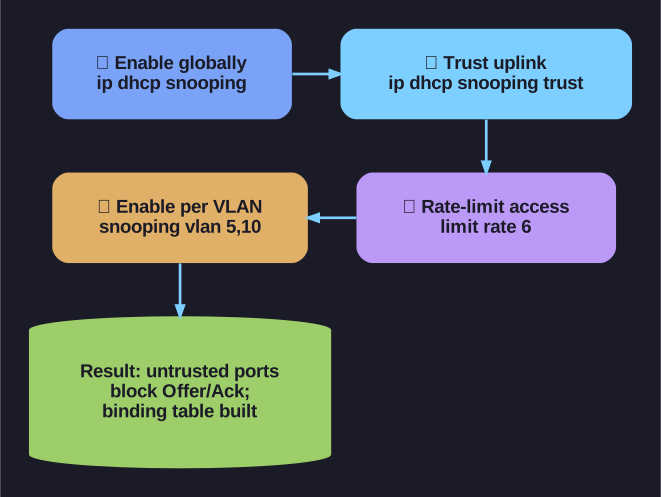
* The four DHCP snooping configuration steps. *
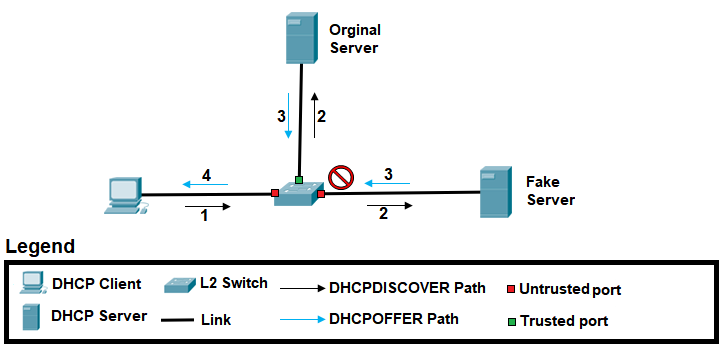
* DHCP snooping: trusted vs untrusted ports. — Michel Bakni, CC BY-SA 4.0, via Wikimedia Commons. *
Step-by-step configuration:
! Step 1: Enable DHCP snooping globally
Switch(config)# ip dhcp snooping

! Step 2: Trust the uplink port to the DHCP server
Switch(config)# interface Fa0/1
Switch(config-if)# ip dhcp snooping trust
Switch(config-if)# exit

! Step 3: Rate-limit untrusted (access) ports
Switch(config)# interface range Fa0/5 - 24
Switch(config-if-range)# ip dhcp snooping limit rate 6
Switch(config-if-range)# exit

! Step 4: Enable DHCP snooping on specific VLANs
Switch(config)# ip dhcp snooping vlan 5,10,50-52
Switch(config)# end
What happens after configuration:
- Untrusted ports (F0/5-24): Only DHCP client messages (Discover, Request) are allowed; DHCP server messages (Offer, Ack) are blocked; rate-limited to 6 packets/sec
- Trusted port (F0/1): All DHCP messages pass freely — this port connects to the legitimate DHCP server
- A binding table is built automatically: maps MAC (Media Access Control) → IP (Internet Protocol) → Port → VLAN → Lease time
Verification:
Switch# show ip dhcp snooping
Switch# show ip dhcp snooping binding
Important: The DHCP snooping binding table is the foundation for both DAI (Dynamic ARP Inspection) and IPSG (IP Source Guard). Without DHCP snooping, neither of those features can work.
Go deeper:
 DHCP snooping (Wikipedia) — rogue-server blocking and how the binding table feeds DAI and IP Source Guard.
 DHCP Snooping (Study-CCNA) — concrete config: global, per-VLAN, trusted ports, plus
 show ip dhcp snooping binding.