How do you configure Dynamic ARP Inspection (DAI) on a Cisco switch, and what validation checks does it perform?
Enable DAI per VLAN (Virtual Local Area Network) (ip arp inspection vlan), trust uplink ports. DAI validates ARP packets against the DHCP (Dynamic Host Configuration Protocol) snooping binding table. Additional checks can validate destination MAC (Media Access Control), source MAC, and IP (Internet Protocol) addresses in ARP packets.
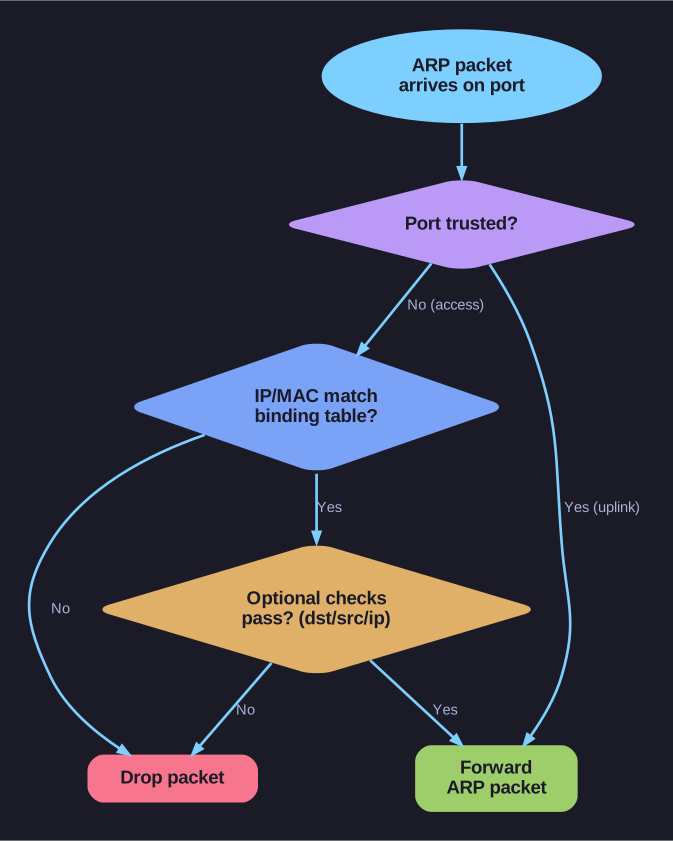
* How DAI decides to forward or drop ARP. *
What DAI stops: an ARP spoofing/poisoning attack — an attacker forges ARP replies that bind their MAC address to the default gateway's IP, so other hosts redirect their traffic through the attacker (a man-in-the-middle). ARP has no way to authenticate a reply, so the switch has to vouch for ARP on the host's behalf — that's DAI's job. It only works because the DHCP snooping binding table already records the legitimate IP↔MAC↔port mappings to check each ARP against.
Configuration:
! Prerequisite: DHCP snooping must already be enabled

! Step 1: Enable DAI on VLANs
Switch(config)# ip arp inspection vlan 10

! Step 2: Trust uplink ports (inter-switch links, router ports)
Switch(config)# interface Fa0/24
Switch(config-if)# ip arp inspection trust
Switch(config-if)# exit

! Optional: Additional validation checks
Switch(config)# ip arp inspection validate dst-mac src-mac ip
DAI validation checks:
| Check | What It Validates |
|---|---|
| Default | Source IP/MAC in ARP body against DHCP snooping binding table |
| dst-mac | Destination MAC in Ethernet header matches target MAC in ARP body |
| src-mac | Source MAC in Ethernet header matches sender MAC in ARP body |
| ip | Checks for invalid IPs (0.0.0.0, 255.255.255.255, multicast) |
⚠️ Gotcha — the validate options don't stack: entering ip arp inspection validate a second time overwrites the previous setting instead of adding to it. To run several checks, list them all on one command line (... validate src-mac dst-mac ip); issuing them as separate commands leaves only the last one active.
DAI Implementation Guidelines:
- Enable DHCP snooping globally and on the relevant VLANs
- Enable DAI on the same VLANs
- All access ports = untrusted (default)
- All uplink ports to other switches/routers = trusted
- Only trusted ports bypass ARP inspection
Rate limiting: DAI includes built-in rate limiting to prevent ARP-based DoS (Denial of Service). Exceeding the rate puts the port in err-disabled state.
For static IP environments (no DHCP snooping entries): Use ARP ACLs:
Switch(config)# arp access-list STATIC-ARP
Switch(config-arp-acl)# permit ip host 10.0.0.5 mac host aaaa.bbbb.cccc
Switch(config)# ip arp inspection filter STATIC-ARP vlan 10
Go deeper:
 DHCP snooping (Wikipedia) — DAI validates ARP against the DHCP-snooping binding database, the prerequisite this builds on.
- RFC 826 — Address Resolution Protocol — why ARP needs external validation (no built-in authenticity check), exactly what DAI's checks supply.