Quiz Entry - updated: 2026.07.30
How do you configure router subinterfaces for router-on-a-stick inter-VLAN routing?
Create a subinterface for each VLAN (Virtual Local Area Network) using interface <physical>.<subif-number>, configure encapsulation dot1q <vlan-id> and assign an IP (Internet Protocol) address, then enable the physical interface with no shutdown.
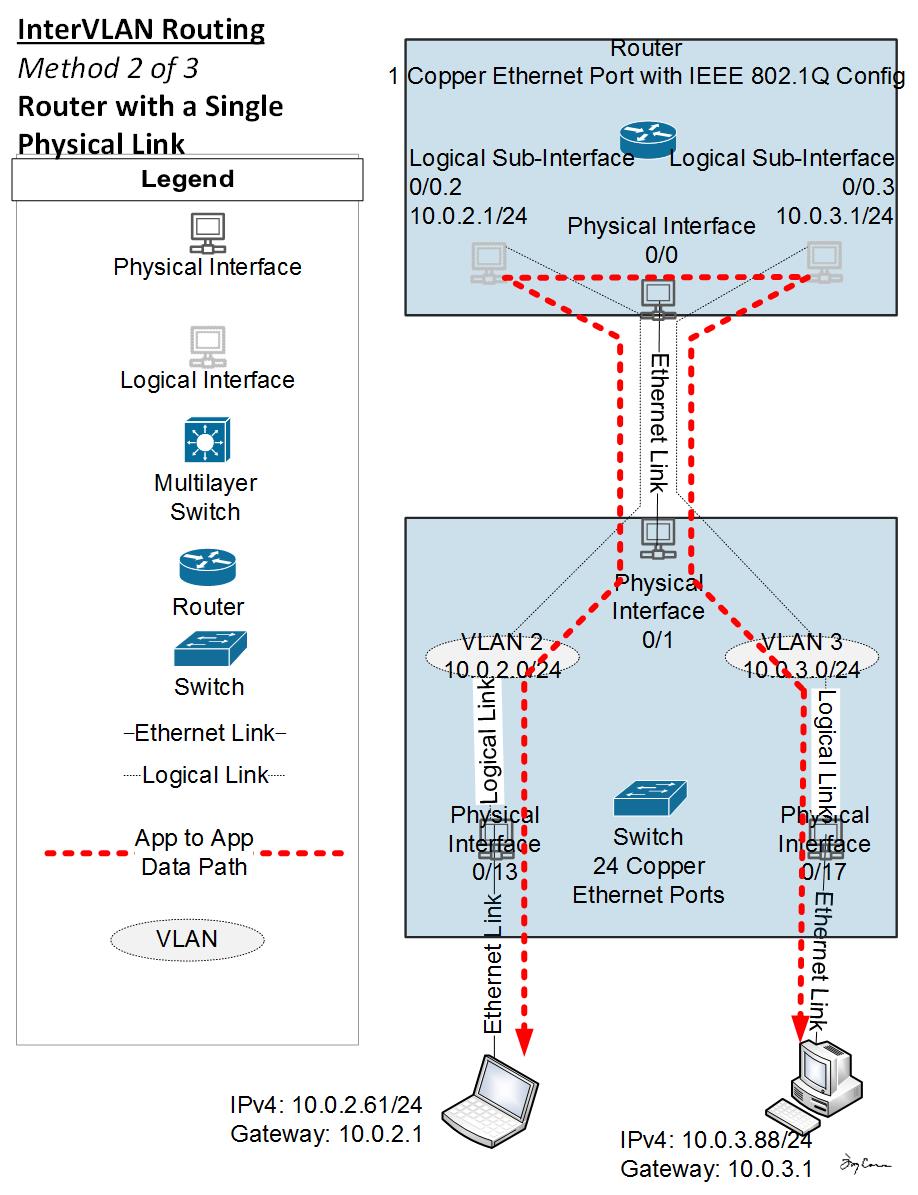
* Single trunk link to router subinterfaces. — Engineertcarman, CC BY-SA 4.0, via Wikimedia Commons. *
Subinterface configuration:
R1(config)# interface G0/0/1.10
R1(config-subif)# description Default Gateway for VLAN 10
R1(config-subif)# encapsulation dot1Q 10
R1(config-subif)# ip add 192.168.10.1 255.255.255.0
R1(config-subif)# exit

R1(config)# interface G0/0/1.20
R1(config-subif)# description Default Gateway for VLAN 20
R1(config-subif)# encapsulation dot1Q 20
R1(config-subif)# ip add 192.168.20.1 255.255.255.0
R1(config-subif)# exit

R1(config)# interface G0/0/1.99
R1(config-subif)# description Default Gateway for VLAN 99
R1(config-subif)# encapsulation dot1Q 99
R1(config-subif)# ip add 192.168.99.1 255.255.255.0
R1(config-subif)# exit
Then enable the physical interface:
R1(config)# interface G0/0/1
R1(config-if)# description Trunk link to S1
R1(config-if)# no shut
Important details:
- The subinterface number (e.g.,
.10) doesn't have to match the VLAN ID, but it's customary to match them for clarity - The
nativekeyword is appended toencapsulation dot1qonly for the native VLAN subinterface - If the physical interface is shut down, all subinterfaces go down with it
- Each subinterface must be on a unique subnet
Go deeper:
 Router on a Stick (NetworkAcademy.IO) — diagram-driven subinterfaces +
 encapsulation dot1Q. CCNA Lab 007: Inter-VLAN Routing — Router on a Stick (Jeremy's IT Lab) — builds the subinterface config live in Packet Tracer.