How do you control services with systemctl (start, stop, enable, disable)?
start/stop act now (this boot only); enable/disable control whether it starts at boot. They're independent axes — combine with enable --now.
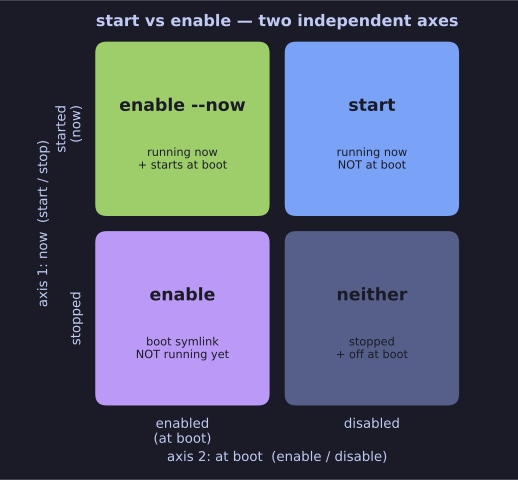
* "Running now" and "starts at boot" are independent axes — start affects this boot, enable creates the boot symlink; combine with enable --now. *
The single most important idea here: "running now" and "starts at boot" are two separate things. start affects the current session; enable creates the boot-time symlink. A service can be enabled but stopped, or running but disabled. They don't imply each other.
| Command | Action |
|---|---|
systemctl start sshd |
Start it right now |
systemctl stop sshd |
Stop it right now |
systemctl restart sshd |
Full stop then start |
systemctl reload sshd |
Re-read config without restarting |
systemctl enable sshd |
Make it start at boot |
systemctl disable sshd |
Don't start at boot |
systemctl mask sshd |
Hard-block: can't be started at all |
systemctl unmask sshd |
Remove the block |
Do both at once (the usual "I want this on now and forever"):
sudo systemctl enable --now sshd
The enable states you'll see from is-enabled:
| State | Meaning |
|---|---|
| enabled | Has a boot-time symlink |
| disabled | No boot symlink |
| static | Can't be enabled — only pulled in as a dependency |
| masked | Symlinked to /dev/null — start is refused, stronger than disabled |
reload vs restart — prefer reload when the service supports it: it re-reads the config with no downtime (e.g. nginx keeps serving), whereas restart drops connections during the brief stop/start. mask vs disable: disabled can still be started manually or by a dependency; masked truly cannot start until unmasked.