How do you create a compressed tar archive, and what's the difference between gzip, bzip2, and xz?
Add one compression flag to the create command — -z gzip, -j bzip2, -J xz — trading speed for smaller size in that order; the result is .tar.gz, .tar.bz2, or .tar.xz.
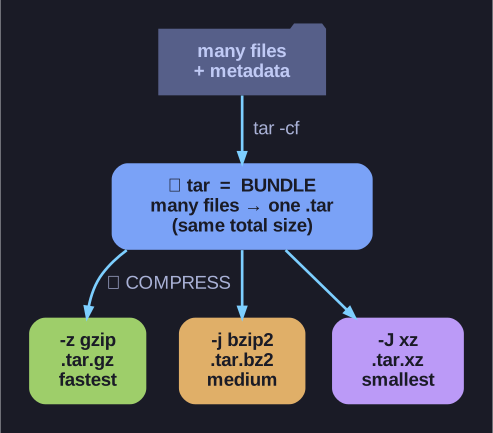
* tar bundles many files into one archive; a separate compressor (-z/-j/-J) then shrinks it, trading speed for size. *
tar itself doesn't compress, but it can pipe its output through a compressor for you when you add the right flag. The three are a clear speed-vs-size spectrum:
| Flag | Algorithm | Extension | Speed | Size |
|---|---|---|---|---|
-z |
gzip | .tar.gz, .tgz |
Fastest | Good |
-j |
bzip2 | .tar.bz2 |
Medium | Better |
-J |
xz | .tar.xz |
Slowest | Best |
tar -czf backup.tar.gz  /data    # the everyday default
tar -cjf backup.tar.bz2 /data    # tighter, slower
tar -cJf backup.tar.xz  /data    # tightest, slowest
Reading the combined flag -czf: create, gzip, filename. Extraction mirrors it (-xzf, -xjf, -xJf), though modern tar auto-detects the compression — so tar -xf backup.tar.gz works without naming the algorithm.
How to choose: gzip for frequent backups where speed matters; xz for things you compress once and download many times (distribution archives, long-term storage) — the extra crunch pays off across every download. As a rough feel, the Linux kernel source compresses from ~1.2 GB to ~180 MB with gzip vs ~130 MB with xz.
Go deeper:
 GNU tar manual — compressed archives — the
 -z/-j/-Jcompression flags and auto-detection on extract.