Quiz Entry - updated: 2026.07.30
How do you make a regular (non-Stratis) filesystem mount automatically at boot via /etc/fstab?
Add one line per filesystem to /etc/fstab — device (best by UUID), mount point, type, options, dump, pass — then test with mount -a before rebooting.
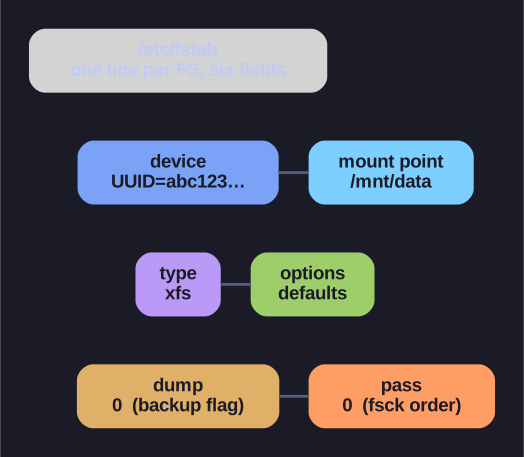
* The six fields of an /etc/fstab record. *
/etc/fstab is the table the system reads at boot to mount filesystems automatically. Each line has six fields:
<device> <mount_point> <type> <options> <dump> <pass>
/dev/vg01/lv01    /mnt/data    xfs    defaults    0 0     # LVM LV, safe by name
UUID=abc123...    /mnt/backup  ext4   defaults    0 0     # plain FS, by UUID
Field notes:
- device — prefer a UUID over
/dev/sdX, since device letters can shift between boots and mount the wrong thing. (LVM paths like/dev/vg01/lv01are an exception — they're already stable, because LVM tracks its PVs by their own internal UUIDs.) - options —
defaultsexpands to a sane set:rw,suid,dev,exec,auto,nouser,async. - dump / pass — legacy backup flag and the fsck order at boot (
0to skip,1for root,2for others).
Always test before you trust it:
mount -a                 # mount every fstab entry now — surfaces typos
systemctl daemon-reload  # if you used systemd-specific options
Why mount -a first is non-negotiable: a broken fstab line can drop the machine into emergency mode on the next boot. Testing live lets you catch the error while you still have a shell.
Go deeper:
 fstab(5) man page — the six
 /etc/fstabfields, UUID usage, and options.