How do you navigate between the different IOS modes? List the commands to move up and down the hierarchy.
Go up with enable then configure terminal, then into sub-modes with line/interface; come back with exit (one level) or end/Ctrl+Z (straight to Privileged EXEC).
IOS arranges its commands in a hierarchy of modes, and you can only run a given command from the mode it belongs to — so navigating that hierarchy is a constant part of configuring a device. You move deeper (more privilege, more specific scope) one step at a time, and you can climb back out either one level or all the way to the top.
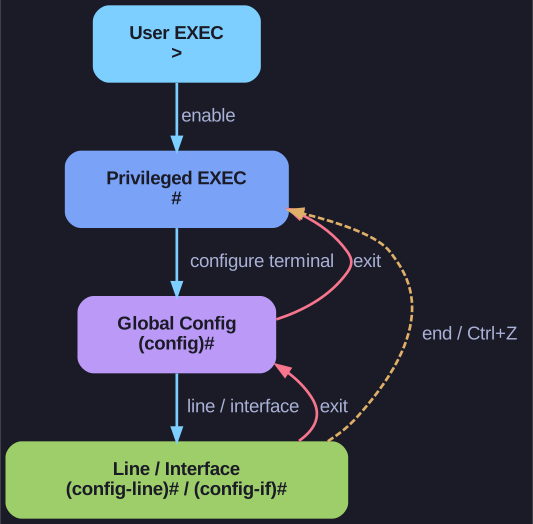
* Going deeper (cyan) vs. climbing out: exit steps back one level (red), end or Ctrl+Z jumps straight to Privileged EXEC (yellow). *
Moving deeper:
enable— User EXEC → Privileged EXEC; unlocks the full command set (show,configure, etc.)configure terminal— Privileged EXEC → Global Config; from here on you are changing the device's configurationline console 0/line vty 0 15— Global Config → Line Config; selects the console or the remote (VTY) lines so you can secure theminterface FastEthernet 0/1— Global Config → Interface Config; selects one port to configure
Climbing back out:
exit— steps back exactly one levelendor Ctrl+Z — jumps straight back to Privileged EXEC from any config mode, no matter how deep you are
The prompt always tells you where you are (e.g. (config-if)# means interface config), so read it before typing a command.
Go deeper:
 Jeremy's IT Lab — Intro to the CLI (CCNA Day 4) — demonstrates enable / configure terminal / exit / end navigation hands-on.
 Cisco IOS — command modes (Wikipedia) — the mode hierarchy these commands move through.