How do you read the file type and permissions from ls -l output?
Read it left to right: 1 char for the file type, then three triplets of rwx for owner / group / other — so -rwxr-xr-x is a regular file the owner can do anything to, while group and others may only read and execute.
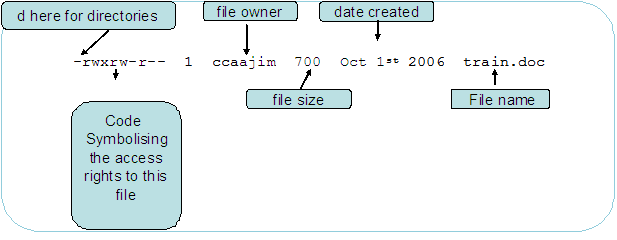
* An ls -l listing broken into its parts — the leading file-type char, the rwx triplets, owner, size, date and filename (the "700" here is byte size, not a mode). — Jimbotyson, CC BY-SA 3.0 / GFDL, via Wikimedia Commons. *
The leading character is a frequent point of confusion: it is NOT a permission, it tells you what kind of thing this is (- file, d directory, l symlink, …). Everything after it is nine permission bits in three fixed groups of three.
| Symbol | Type |
|---|---|
- |
Regular file |
d |
Directory |
l |
Symbolic link |
b |
Block device |
c |
Character device |
p |
Named pipe (FIFO) |
s |
Socket |
Permission positions:
-rwxr-xr-x
│├─┤├─┤├─┤
││  │  └── other: r-x (read, execute)
││  └── group: r-x (read, execute)
│└── user: rwx (read, write, execute)
└── type: regular file
Full ls -l output:
-rwxr-xr-x 1 labstudent labstudent 4096 Jan 25 10:00 script.sh
│          │ │          │          │    │            └── filename
│          │ │          │          │    └── modification date
│          │ │          │          └── size in bytes
│          │ │          └── group owner
│          │ └── user owner
│          └── hard link count
└── type + permissions
Quick reference:
drwxr-xr-x= directory, owner full access, others can read/enter-rw-r--r--= file, owner read/write, others read-only
Go deeper:
 File-system permissions — notation (Wikipedia) — the leading type character plus the three rwx triplets.