How do you troubleshoot DNS issues, and what tools help?
Users often blame the internet link when DNS is actually the problem; verify the configured DNS server with ipconfig /all, and use nslookup to manually issue DNS queries and inspect the response.
The Domain Name System (DNS) translates human-friendly names like example.com into the IP addresses devices actually route to, so when DNS fails, sites become unreachable by name even though the underlying connection is fine — which is why users so often misreport it as "the internet is down." The fast way to isolate it is to compare two pings: if pinging an IP address succeeds but pinging the matching hostname fails, the path is healthy and name resolution is the culprit. Two tools do the diagnosis. ipconfig /all (on Windows) shows which DNS server the host is configured to use — assigned manually or handed out by Dynamic Host Configuration Protocol (DHCP) — so you can check it is reachable and correct. nslookup then lets you issue DNS queries by hand and read the raw response, confirming whether the server answers and what it returns. Any reachable DNS server can resolve public names, though many organisations run their own.
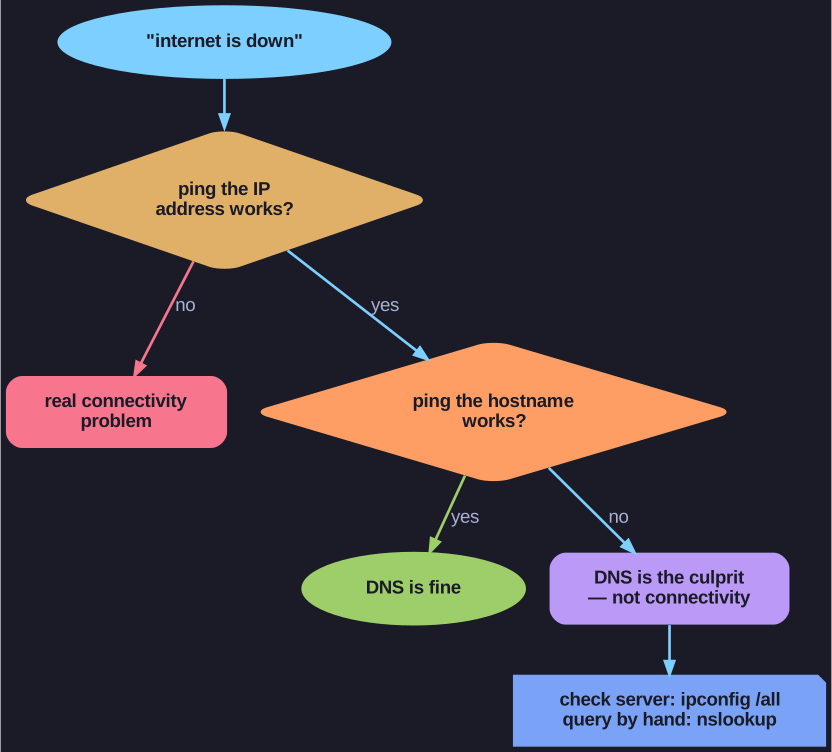
* Ping the IP, then the hostname: IP works but name fails means DNS, not connectivity — confirm with nslookup. *
Troubleshooting DNS Issues:
- Users commonly mistake DNS failures for a down internet link, since name resolution failing makes sites unreachable by name.
- DNS server addresses can be assigned manually or automatically via DHCP; any reachable DNS server can resolve names, though many organizations run their own.
- Verify which DNS server a Windows host is using with
ipconfig /all. nslookuplets a user manually place DNS queries and analyze the response — useful for isolating whether the problem is name resolution or connectivity.
Note: Cisco's OpenDNS (addresses 208.67.222.222 and 208.67.220.220) provides a secure DNS service that filters phishing and some malware sites.
Key insight: If ping to an IP address works but ping to a hostname fails, the problem is DNS, not connectivity — nslookup confirms it quickly.
Go deeper:
 Wikipedia — Domain Name System — how name resolution works, so you understand what fails when DNS is down.
- Wikipedia — nslookup — the tool for issuing DNS queries by hand and reading the raw response.