How does a switch learn MAC addresses? (The "Learn" process)
By reading the SOURCE MAC of every incoming frame and recording it against the port it arrived on — adding new ones, refreshing the 5-minute timer on existing ones, and moving an entry if the same MAC shows up on a different port.
The clever part of learning is that a switch builds its table from the source address, not the destination. The logic: if a frame arrived on port 3 carrying source MAC (Media Access Control) address X, then device X must be reachable through port 3 — so the switch can record that and use it later when something needs to reach X. For every incoming frame it reads the source MAC and checks the table:
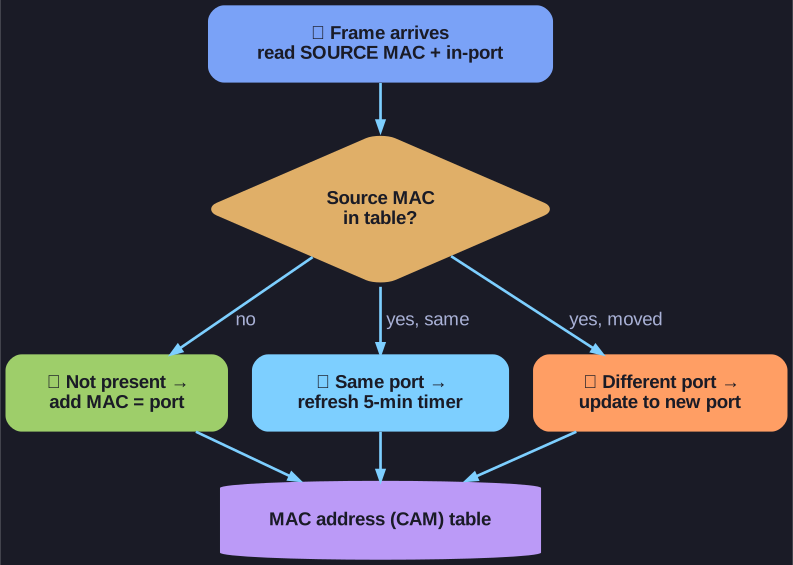
* The switch reads each frame's source MAC and either adds it, refreshes its 5-minute timer, or moves the entry to a new port. *
- Source MAC not in the table → add it, associated with the port it came in on.
- Source MAC already there, same port → just refresh the aging timer. Entries expire after a default 5 minutes of inactivity so the table self-cleans when devices unplug.
- Source MAC already there, but on a different port → update the entry to the new port. This handles a device being moved to another switch port (or roaming).
Example: PC-A (MAC 00-0A) sends a frame in on port 1 → the switch records "port 1 = 00-0A." It learns the source, but it still hasn't learned where PC-A's intended destination is — that gets learned the same way when the other host replies.
Go deeper:
-
 How a Switch & Router Work — PowerCert (YouTube) — animated walk-through of a switch learning MAC-to-port mappings as frames flow.
 -
 Host to Host through a Switch — Practical Networking — the learning, flooding, forwarding and filtering functions built up step by step.
 -
How switches work (Study-CCNA) — first-conversation example showing the table populate from source MACs.