How does a VLAN double-tagging attack work, and why does it only work in one direction?
The attacker sends a frame with two 802.1Q tags: the outer tag matches the native VLAN (Virtual Local Area Network) (stripped by the first switch), the inner tag is the target VLAN. The second switch reads the inner tag and delivers the frame. It's one-way because return traffic can't be double-tagged back.
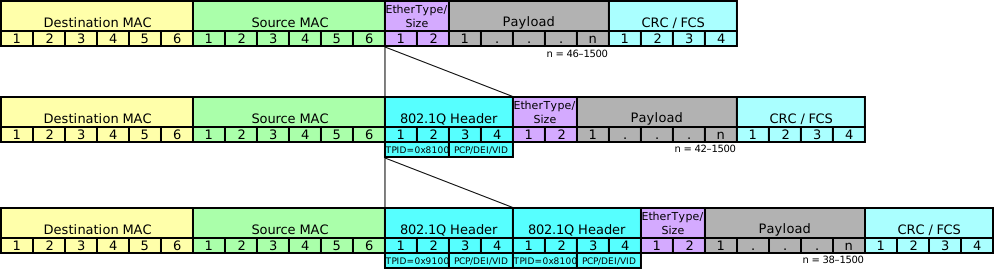
* Double-tagged frame: outer and inner VLAN tags. — Luca Ghio, CC BY-SA 4.0, via Wikimedia Commons. *
Step-by-step attack:
Step 1: Attacker sends a double-tagged frame. The outer tag matches the native VLAN of the trunk port. The inner tag is the target VLAN (e.g., VLAN 20).
Step 2: The first switch processes the outer tag. Since it's the native VLAN, the switch strips the outer tag (native VLAN traffic is sent untagged on 802.1Q trunks). The frame is forwarded onto the trunk with only the inner tag remaining.
Step 3: The second switch receives the frame and sees the inner tag (VLAN 20). It doesn't know this was a double-tagged frame — it simply forwards the frame to VLAN 20 ports.
Why it's one-way only:
- The attacker can send frames to the target VLAN
- But return traffic from VLAN 20 is properly tagged and delivered normally — it won't reach the attacker on the native VLAN
- So the attacker can inject packets but cannot receive responses
Requirements for the attack to work:
- Attacker must be on a port in the same VLAN as the native VLAN of the trunk
- The trunk must use the same native VLAN on both ends
Prevention:
- Change the native VLAN to an unused VLAN (e.g., VLAN 999):
switchport trunk native vlan 999 - Tag native VLAN traffic:
vlan dot1q tag native(global command) - Never use the default VLAN 1 as the native VLAN
Go deeper:
 VLAN hopping — double tagging (Wikipedia) — the double-tag mechanism, why the native-VLAN outer tag is stripped (hence one-way), and native-VLAN mitigations.