How does FTP work and why does it use two connections?
FTP uses two TCP connections: a control connection on port 21 for commands/replies and a separate data connection on port 20 for the actual file transfer.
FTP (File Transfer Protocol):
A protocol developed to allow data transfers between a client and a server.
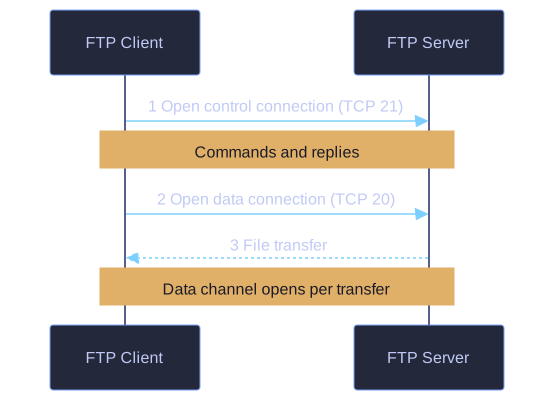
* A control connection on TCP 21 carries commands; a separate data connection on TCP 20 carries the files. *
Two Separate Connections:
| Connection | Port | Purpose |
|---|---|---|
| Control | TCP 21 | Client commands and server replies |
| Data | TCP 20 | Actual file transfer |
Process:
- Client establishes first connection to server on port 21 for control traffic (commands and responses)
- Client establishes second connection on port 20 for actual data transfer
- Data connection is created every time there is data to be transferred
Data Transfer Modes:
- Download (pull): Client downloads data from server
- Upload (push): Client uploads data to server
Client                          Server
  │                               │
  │──── Control (port 21) ───────→│
  │     Commands & responses      │
  │                               │
  │←─── Data (port 20) ──────────→│
  │     File transfer             │
Key insight: The two-connection model allows commands and data to flow independently, improving efficiency.
Go deeper:
-
 FTP, SFTP, TFTP Explained — PowerCert on the file-transfer protocols and their differences.
 -
 File Transfer Protocol (Wikipedia) — control vs data connections, active vs passive mode.