Quiz Entry - updated: 2026.07.30
How does HTTP work when loading a web page?
The browser splits the URL into protocol/server/file, uses DNS to get the server's IP, sends an HTTP GET, receives the HTML in the response, then renders it.
HTTP (Hypertext Transfer Protocol) - Web Page Loading Process:
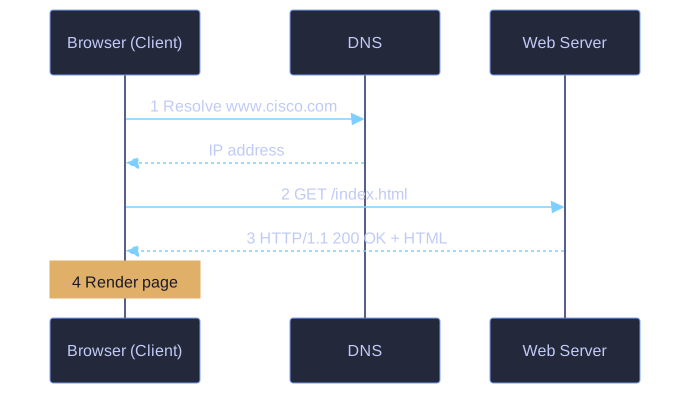
* The browser resolves the name via DNS, sends a GET, receives 200 OK with HTML, then renders. *
Step 1 - URL Interpretation: Browser parses the URL into three parts:
http- the protocol/schemewww.cisco.com- the server nameindex.html- the specific filename
Step 2 - DNS Resolution & Request:
- Browser queries DNS to convert server name to IP address
- Client sends HTTP GET request to the server asking for the file
Step 3 - Server Response:
- Server sends HTTP response with status code (e.g.,
HTTP/1.1 200 OK) - Response includes HTML code for the web page
Step 4 - Rendering:
- Browser deciphers the HTML code and formats the page for display
HTTP Response Example:
HTTP/1.1 200 OK
Date: Mon, 23 May 2005 22:38:34 GMT
Server: Apache/1.3.27
Content-Type: text/html; charset=UTF-8
<html>
<head><title>Cisco Systems</title></head>
<body>...CONTENTS...</body>
</html>
Go deeper:
-
 An overview of HTTP (MDN) — clear breakdown of the request/response cycle.
 -
RFC 9110 — HTTP Semantics — the authoritative HTTP specification.