How does Linux determine which permissions apply to a user accessing a file?
It checks in order — owner? then group? then other? — and uses the FIRST class that matches, stopping there. The classes are NOT combined and it is NOT "most permissive wins".
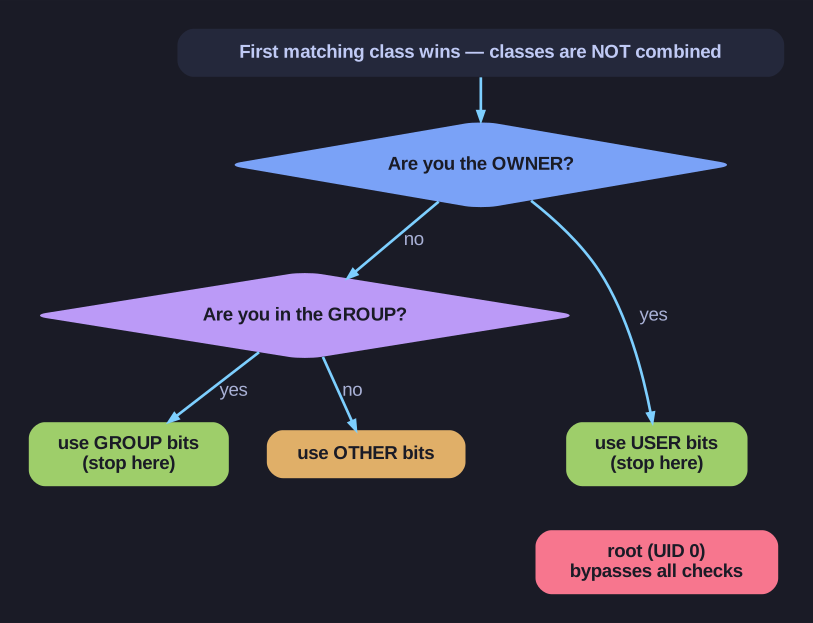
* Permission resolution stops at the first matching class (owner, then group, then other) — and root bypasses the check. *
The surprising consequence: if you're the owner but the owner bits say ---, you're denied even when group or other would allow it — the kernel never falls through to a later class. (As owner you can still chmod to fix it, since that right comes from ownership, not the permission bits.) Two more rules complete the model: there's no inheritance — a file's permissions are its own, unaffected by the parent directory — and root (UID 0) is exempt from the whole check.
1. Is user the OWNER? → Use USER permissions
2. Is user in the GROUP? → Use GROUP permissions
3. Otherwise → Use OTHER permissions
Important: Only ONE category applies!
Example - Surprising behavior:
-rw----rw- owner group file
- If
owneraccesses: can read/write (user: rw-) - If member of
groupaccesses: NO access (group: ---) - If anyone else accesses: can read/write (other: rw-)
The owner with no permissions can still:
- Change permissions (
chmod) - Transfer ownership (
chownif root)
No inheritance:
- Directory permissions don't automatically apply to contents
- Each file has its own permissions
- Must explicitly set permissions on each file
Root exception:
- Root (UID 0) bypasses ALL permission checks
- Can read/write/execute anything regardless of permissions
Tip: Think of permissions like security badges - you only get to use one badge, not combine them.