Map these ten protocols — ARP, IP, ICMP, TCP, UDP, DHCP, DNS, HTTP, HTTPS, and FTP — onto their OSI layers. Which layer does each operate on, and how do they depend on each other?
ARP (L2) → IP/ICMP (L3) → TCP/UDP (L4) → DHCP/DNS/HTTP/HTTPS/FTP (L7). Each layer abstracts the layer below.
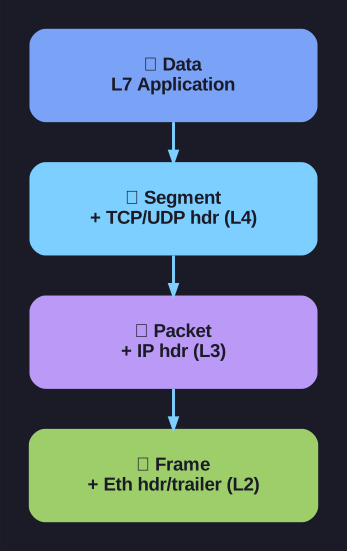
* Encapsulation: data gains transport, network and link headers down the stack. *
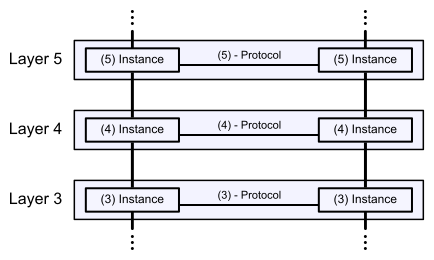
* The seven-layer OSI model and how data traverses the stack. — Runtux, Public domain, via Wikimedia Commons. *
The full stack:
| Layer | Protocols | Job |
|---|---|---|
| 7 Application | HTTP, HTTPS, FTP, DHCP, DNS | App data + helper services |
| 4 Transport | TCP, UDP | Reliable streams or fast datagrams + ports |
| 3 Network | IP, ICMP | End-to-end packet routing |
| 2 Data Link | ARP, Ethernet | Local LAN delivery via MAC |
The dependency chain (browsing https://www.example.com):
1. DHCP   (L7)   gets you an IP, gateway, DNS server
2. ARP    (L2)   resolves gateway's MAC
3. DNS    (L7)   resolves www.example.com → 93.184.216.34
4. ARP    (L2)   resolves gateway's MAC for the outbound packet
5. TCP    (L4)   three-way handshake to 93.184.216.34:443
6. TLS    (L7)   handshake with Client Hello / Server Hello
7. HTTPS  (L7)   GET request, response
8. ICMP   (L3)   used by ping/tracert if you debug along the way
Why layering matters:
Each layer doesn't care about the others:
- HTTP doesn't know whether IP routes through 5 hops or 50
- TCP doesn't know whether the data is HTTP or FTP
- IP doesn't know whether the packet is TCP or UDP
- Ethernet doesn't know whether the frame's payload is IP or ARP
This separation is what lets the internet evolve — IPv6 replaced IPv4 without rewriting HTTP.
Where "L7-helper-for-L3" fits:
DHCP and DNS are technically L7 (they're apps using UDP), but they exist to make L3 work — assigning IPs and resolving names. This is the meta-pattern: helper protocols make the stack work even though they sit above what they enable.
Tip: When troubleshooting connectivity, debug top-down: ping (L3) → check DNS (L7) → check TCP port (L4) → check certificate (L7-TLS) → check HTTP response (L7-app). Whichever layer fails first localizes the problem.
Go deeper:
 OSI model (Wikipedia) — the seven-layer reference model with per-layer protocol examples.
- Internet protocol suite (Wikipedia) — maps these exact protocols onto the TCP/IP layers.