Walk through troubleshooting a failed connection: PC1 cannot reach PC3, but R1 can reach R2 and R3. Where is the problem?
If R1 can reach R2 and R3 but PC1 can't reach PC3, the problem is likely an incorrect or missing static route on one of the intermediate routers — check R2's routing table for the specific destination network.
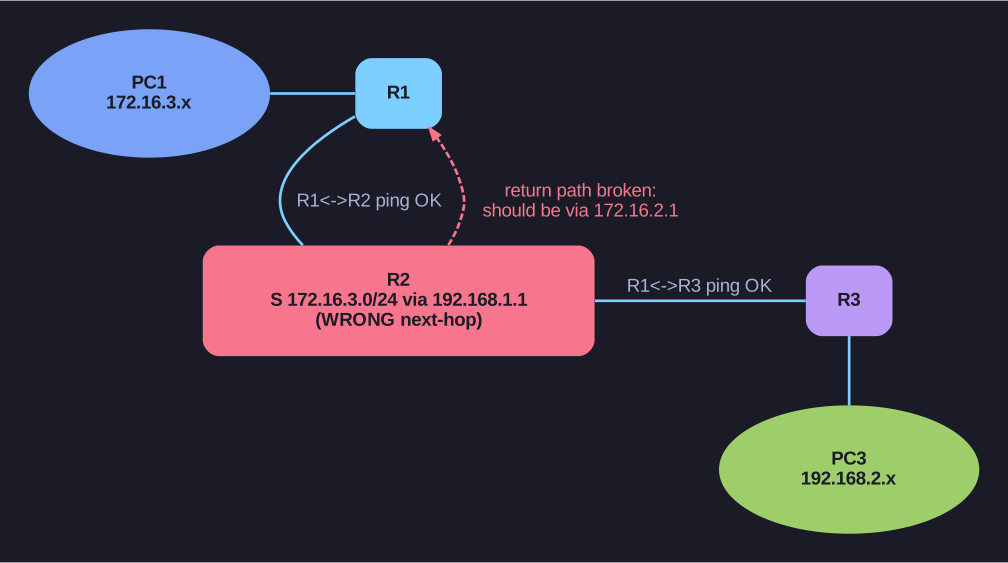
* Isolating a wrong-next-hop return route. *
Systematic troubleshooting approach:
Step 1 — Test from the source:
R1# ping 192.168.2.1 source 172.16.3.1    ← Extended ping from R1's LAN interface
.....                                       ← FAILS
This simulates PC1's traffic — the source IP (Internet Protocol) is on R1's LAN (Local Area Network).
Step 2 — Test each hop:
R1# ping 172.16.2.2      ← R2's interface — SUCCESS
R1# ping 192.168.1.2     ← R3's interface — SUCCESS
R1 can reach R2 and R3 from its serial interfaces — Layer 1/2/3 between routers is fine.
Step 3 — Narrow down — check R2's routing table:
R2# show ip route | begin Gateway
S    172.16.3.0/24 [1/0] via 192.168.1.1     ← Wrong next-hop! Should be via 172.16.2.1
Found it! R2's static route to R1's LAN (172.16.3.0/24) points to the wrong next-hop IP.
Step 4 — Fix:
R2(config)# no ip route 172.16.3.0 255.255.255.0 192.168.1.1    ! Remove wrong route
R2(config)# ip route 172.16.3.0 255.255.255.0 172.16.2.1        ! Add correct route
Step 5 — Verify:
R1# ping 192.168.2.1 source 172.16.3.1 ← Now works!
Key lesson: When ping fails, isolate the problem hop-by-hop. Test from the router, not just from the PC. Use extended ping to specify the source interface — this reveals whether the problem is in the forward path or the return path.
Go deeper:
 traceroute (Wikipedia) — hop-by-hop isolation that complements per-router routing-table inspection.