What are Linux pipes and how do they differ from redirection?
A pipe (|) feeds one command's stdout straight into the next command's stdin — redirection talks to files, pipes talk to programs.
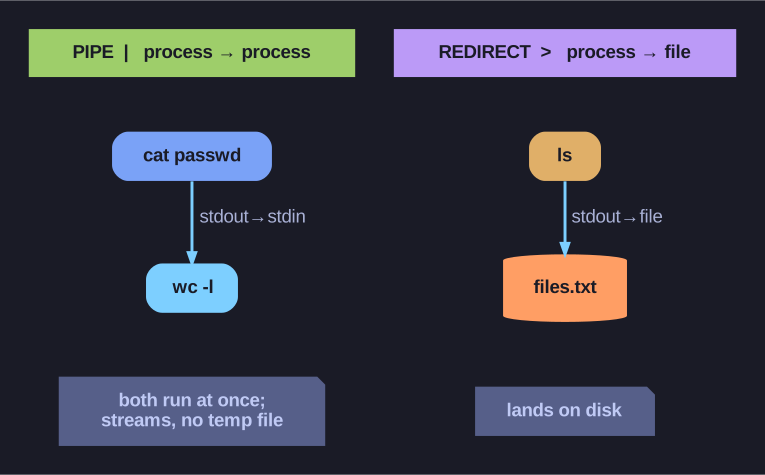
* Pipe = process→process (concurrent, no temp file); redirect = process→file on disk. *
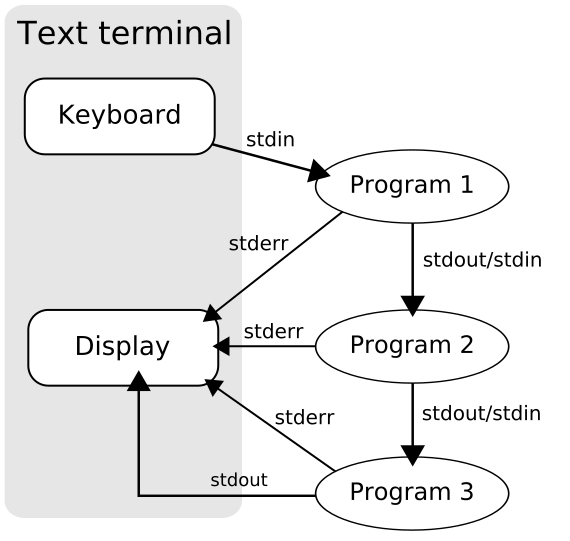
* A pipeline wires each program's stdout into the next program's stdin; stderr still goes to the terminal. — XcepticZP, Public domain, via Wikimedia Commons. *
cat /etc/passwd | wc -l # count the lines in /etc/passwd
Here cat's output never reaches the screen; it flows into wc -l, which counts the lines. The terminal only shows the final number.
Redirection (>, >>, <) |
Pipe (|) |
|
|---|---|---|
| Other end | a file on disk | another program |
| Used for | save to / load from disk | chain commands together |
Why pipes are special: both commands run at the same time, not one-then-the-other. Data streams through as it's produced, so producer | consumer can start consuming before the producer finishes — and nothing has to be stored on disk in between. That's why pipelines handle huge or even endless streams (like tail -f log | grep ERROR) without filling up a temp file.
Gotcha: a pipe only carries stdout. Errors (stderr) still go to the screen unless you fold them in with 2>&1 before the pipe — e.g. find / -name x 2>&1 | less.
Go deeper:
 Pipeline (Unix) — Wikipedia — a pipe carries stdout to the next stdin and stages run concurrently (the key contrast with file redirection).