What are the common RAID levels and their trade-offs?
RAID combines disks for redundancy and/or speed: 0 = stripe (fast, no safety), 1 = mirror (full copy), 5/6 = stripe + parity (survive 1 or 2 failures), 10 = mirror + stripe (both).
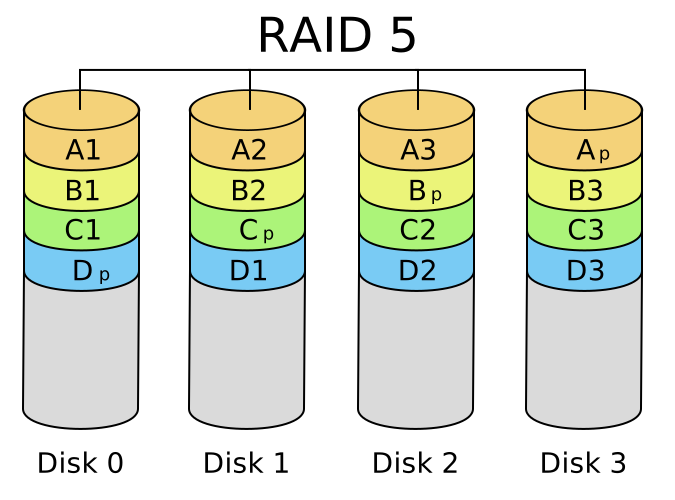
* RAID 5 — striping with parity distributed across all disks, so any one disk can fail and be rebuilt. — Cburnett, CC BY-SA 3.0 / GFDL, via Wikimedia Commons. *
RAID ("Redundant Array of Independent Disks") spreads data across several disks so the array is faster, more reliable, or both than a single disk. The levels trade capacity, speed, and safety differently:
| Level | Technique | Min disks | Survives | Best for |
|---|---|---|---|---|
| 0 | Striping | 2 | nothing | Raw speed (data split across disks) |
| 1 | Mirroring | 2 | 1 disk | Redundancy (every disk is a full copy) |
| 5 | Striping + parity | 3 | 1 disk | Balanced capacity + safety |
| 6 | Striping + double parity | 4 | 2 disks | Higher safety on big arrays |
| 10 | Mirror + stripe | 4 | 1 per mirror pair | Speed and redundancy |
How parity works (RAID 5/6): instead of a full mirror, the array stores a computed checksum block. If one disk dies, its data is reconstructed from the survivors plus the parity — so you only "spend" one disk's capacity (two, for RAID 6) instead of half. Striping (level 0) splits each file across disks so reads/writes happen in parallel, but with zero redundancy a single failure loses everything.
You can run RAID with standalone mdadm, with dm-raid, or inside LVM (lvcreate --type raid1); LVM supports levels 0, 1, 4, 5, 6, and 10.
Critical caveat: RAID is not a backup. It protects against disk failure, but it faithfully replicates an accidental rm -rf, ransomware, or corruption to every disk instantly. Use RAID for uptime, real backups for recovery.
Go deeper:
 Standard RAID levels — Wikipedia — RAID 0/1/5/6 with the capacity/safety trade-offs.