What are the Linux process states and their flags?
The core states are R (running/runnable), S (interruptible sleep), D (uninterruptible sleep), T (stopped), and Z (zombie).
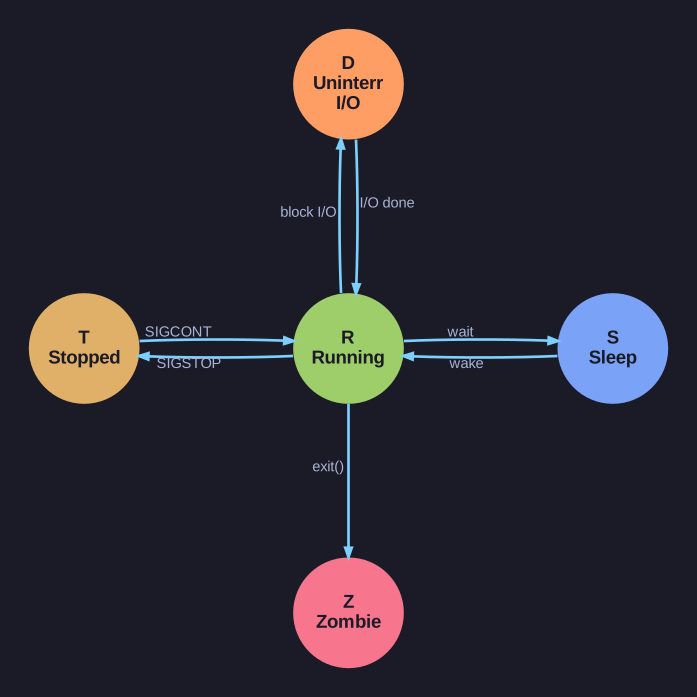
* Process states orbit R (Running) — sleep/wake, block/unblock on I/O, stop/continue — and the one-way exit() into Z. *
A process is almost never actually executing — on a busy machine, most are sleeping, waiting for something. The state letter (the STAT column in ps) tells you what each one is doing right now:
| Flag | State | Meaning |
|---|---|---|
| R | Running / Runnable | Executing now, or ready and waiting for a CPU |
| S | Interruptible sleep | Waiting for an event, but a signal can wake it |
| D | Uninterruptible sleep | Blocked in I/O (disk/network); signals are deferred |
| T | Stopped | Paused by a signal (SIGSTOP / Ctrl+Z) |
| Z | Zombie | Finished, but parent hasn't read its exit status yet |
| I | Idle | Idle kernel thread |
The crucial pair is S vs D. Both are "asleep", but an S process can be interrupted — you can Ctrl+C or kill it. A D process is mid-I/O at a point where waking it would corrupt the operation, so the kernel refuses signals until the I/O finishes. That's why a process stuck in D (usually a hung disk or NFS mount) can't even be killed with kill -9 and can drag the whole system down.
Suffix flags add detail next to the state letter:
<= elevated priority,N= lowered priority (niced)s= session leader,l= multithreaded+= in the foreground process group
Example: Ss = sleeping and a session leader. Tip: processes wedged in D are your prime suspect for unexplained sluggishness.
Go deeper:
 ps(1) — PROCESS STATE CODES (man7.org) — R/S/D/T/Z and the suffix flags (
<,N,s,l,+) in STAT.- Process state (Wikipedia) — the OS-theory view (ready/running/blocked/terminated) behind the Linux letters.