Quiz Entry - updated: 2026.07.30
What are the main components in a computer's bus architecture?
The CPU, main memory, and I/O devices connected by buses, with an I/O bridge linking the fast system/memory buses to the slower I/O bus.
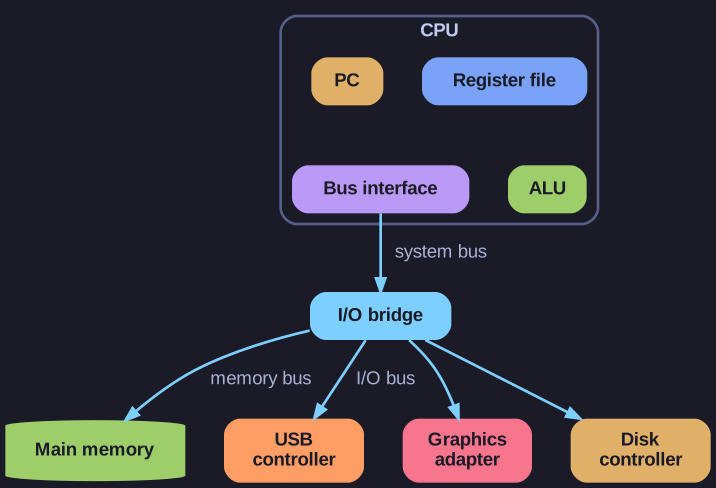
* Buses connect the CPU to memory and to peripheral controllers through an I/O bridge. *
         CPU
    [Register file]
    [PC]    [ALU]
         |
    [Bus interface]
         |
    System bus -------- Memory bus
         |                  |
    [I/O bridge] -------- [Main memory]
         |
      I/O bus
    /    |    \
 [USB] [Graphics] [Disk]
   |       |         |
Mouse   Display    Disk
Keyboard
Inside the CPU:
- PC (Program Counter): Holds the memory address of the next instruction to fetch - it's the CPU's "bookmark" in the program
- ALU (Arithmetic Logic Unit): The calculator - performs all arithmetic (+, -, ×, ÷) and logic (AND, OR, comparisons) operations
- Register file: Tiny, ultra-fast storage (typically 16-32 registers) that holds data the CPU is actively working on - much faster than RAM
- Bus interface: Translates CPU's internal signals to the bus protocol
The buses (communication highways):
- System bus: High-speed connection between CPU and I/O bridge - carries addresses, data, and control signals
- Memory bus: Dedicated high-bandwidth path to RAM - optimized for the CPU's constant need to fetch instructions and data
- I/O bus: Slower, standardized bus (PCIe, USB, SATA) for peripherals - designed for compatibility rather than raw speed
The I/O Bridge (chipset/northbridge):
- Acts as a translator between the fast system/memory buses and slower I/O bus
- Handles the speed mismatch - CPU runs at GHz, but USB runs at MHz
- Contains the memory controller (in older systems; modern CPUs have it on-die)
Controllers: Specialized chips that "speak the language" of each device type - USB controller handles USB protocol, graphics controller renders pixels, disk controller manages read/write operations.
Go deeper:
 Bus (computing) (Wikipedia) — defines address/data/control buses and how the CPU, memory and I/O devices share them.