Quiz Entry - updated: 2026.07.30
What are the main operating modes in VIM and how do you switch between them?
Four modes — Normal (commands), Insert (i to type), Visual (v to select), Command (: for :w/:q) — and Esc always returns to Normal.
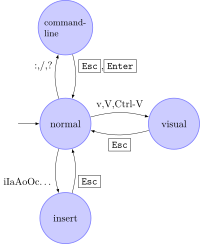
* Vim's mode transitions — Normal is the hub, with Insert, Visual and Command-line reached from it (Esc always returns to Normal). — Harp, CC BY-SA 4.0, via Wikimedia Commons. *
| Mode | Purpose | Enter with | Exit with |
|---|---|---|---|
| Normal | Navigation, commands | Default/Esc |
- |
| Insert | Type/edit text | i |
Esc |
| Visual | Select text | v, V, Ctrl+v |
Esc |
| Command | Execute commands | : |
Esc or Enter |
Mode switching diagram:
Normal ←──Esc──→ Insert (i)
   ↓
   : ←──Esc/Enter
   ↓
Command Mode

Normal ←──Esc──→ Visual (v, V, Ctrl+v)
Key commands by mode:
- Normal:
i(insert),:(command),v(visual),p(paste),y(yank),d(delete) - Command:
:q(quit),:w(write),:q!(force quit),:help,:e(new file) - Visual:
v(characters),Shift+V(lines),Ctrl+v(blocks)
The golden rule: when lost or stuck, hit Esc to get back to Normal mode — every command flows from there. Almost every vim "I'm trapped" moment is solved by Esc followed by :q!.
Go deeper:
 Vim help: intro.txt — modes (vimhelp.org) — the official mode list and the Normal/Insert/Visual/Command transition table.