What are the three basic Linux file permissions and what do they mean?
r = read, w = write, x = execute — but each means something different on a file than on a directory, which is the part people get wrong.
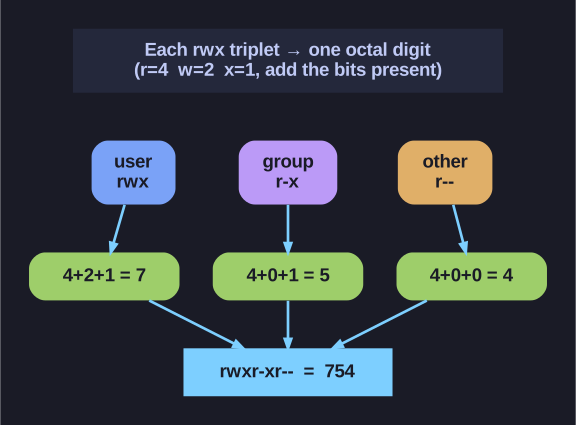
* Reading a permission mode as octal — add the present bits per triplet (754). *
The crucial twist is the directory column. A directory is really a list mapping names to inode numbers, so: r lets you see the names (ls), w lets you change the list — i.e. create, rename, or delete files inside, regardless of who owns those files — and x lets you traverse into it (cd, and access a file by its full path). That's why you can be allowed to delete a file you don't own (you have w on the directory) yet unable to read a file in a directory you can't x into.
| Permission | On Files | On Directories |
|---|---|---|
| r (read) | View file contents | List directory contents (ls) |
| w (write) | Modify file contents | Create/delete files in directory |
| x (execute) | Run as program | Enter directory (cd) |
Permission display (ls -l):
-rwxr-xr-- 1 user group 4096 Jan 1 12:00 file
│└┬┘└┬┘└┬┘
│ │  │  └── Other (everyone else)
│ │  └── Group
│ └── User (owner)
└── File type (- = file, d = directory)
Why octal? Each of the three permission slots (rwx) is one bit, so a set of three is a 3-bit number, and a 3-bit number is exactly one octal digit (0–7). Read it as binary place values — r is the 4s bit, w the 2s bit, x the 1s bit — and add up the ones that are present:
| Permission | Binary | Octal |
|---|---|---|
| r (read) | 100 | 4 |
| w (write) | 010 | 2 |
| x (execute) | 001 | 1 |
Examples:
rwx= 4+2+1 = 7rw-= 4+2+0 = 6r-x= 4+0+1 = 5r--= 4+0+0 = 4
So a full mode like rwxr-xr-- is read three digits at a time: rwx=7, r-x=5, r--=4 → 754.
Mnemonic: Think 4-2-1 like binary place values!
Go deeper:
 File-system permissions (Wikipedia) — the rwx model for files vs directories and the octal (4-2-1) notation.