Quiz Entry - updated: 2026.07.30
What are the three layers of LVM (PV, VG, LV)?
Physical Volumes (PV) are disks prepared for LVM; they're pooled into a Volume Group (VG); Logical Volumes (LV) are flexible "virtual partitions" carved out of that pool.
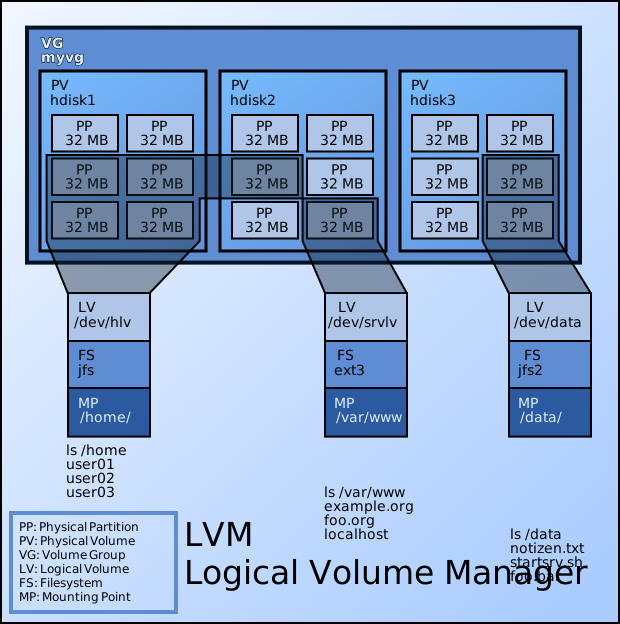
* PV → VG → LV: how the three LVM layers stack. — Emanuel Duss, CC BY-SA 3.0 / GFDL, via Wikimedia Commons. *
LVM stacks three layers, each abstracting the one below:
Physical disks   →   PV          →   VG          →   LV
/dev/sdb,/dev/sdc    (prepared)      (storage pool)  (virtual partition)
| Layer | What it is | Why it exists |
|---|---|---|
| Physical Volume (PV) | A whole disk or partition initialized for LVM use | Stamps LVM metadata onto raw storage so the pool can claim it |
| Volume Group (VG) | A pool built from one or more PVs | Merges separate disks into a single reservoir of space to allocate from |
| Logical Volume (LV) | A slice carved out of the VG, formatted with a filesystem | The flexible "partition" your filesystem actually lives on |
The relationships are the key exam point:
- A PV belongs to exactly one VG.
- A VG can hold many LVs, drawing from the combined capacity of all its PVs.
- The VG is internally chopped into fixed-size Physical Extents (PEs) — the actual allocation units (see the PE card).
So to grow an LV you don't repartition a disk; you just hand it more free extents from the VG, and if the VG is full you add another PV to it first.
Mnemonic: "Pizza Very Good, Large Volume" → PV → VG → LV.
Go deeper:
 Logical Volume Manager (Linux) — Wikipedia — defines PV, VG, and LV and their one-to-many relationships.