Quiz Entry - updated: 2026.07.30
What are the three port security violation modes, and how does each respond when an unauthorized MAC (Media Access Control) address is seen?
Shutdown (default) disables the port entirely. Restrict drops the offending frames and sends a syslog alert. Protect silently drops frames with no notification at all.
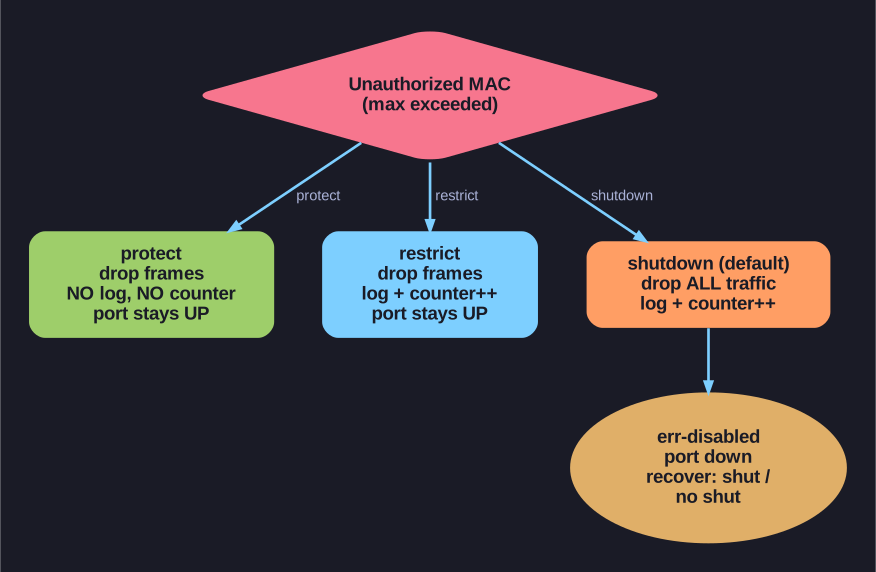
* The three port-security violation modes. *
| Mode | Drops Traffic? | Sends Syslog? | Increments Violation Counter? | Port State |
|---|---|---|---|---|
| Shutdown (default) | Yes — all traffic stopped | Yes | Yes | err-disabled — completely down |
| Restrict | Yes — only violating MACs | Yes | Yes | Up — authorized MACs still work |
| Protect | Yes — only violating MACs | No | No | Up — authorized MACs still work |
Configuration:
Switch(config-if)# switchport port-security violation shutdown    ! Default
Switch(config-if)# switchport port-security violation restrict
Switch(config-if)# switchport port-security violation protect
Shutdown mode (default):
- Port immediately transitions to err-disabled state
- Port LED turns off
- Console message:
%PM-4-ERR_DISABLE: psecure-violation error detected on Fa0/1 - No traffic flows — not even from the originally authorized MAC
- Requires manual recovery:
shutdownthenno shutdown
Restrict mode:
- Only frames from unauthorized MACs are dropped
- Authorized MACs continue to work normally
- Generates syslog messages — you'll know about the violation
- Good for: monitoring without disrupting legitimate users
Protect mode:
- Same as restrict but with no logging whatsoever
- The violation is completely silent — you won't know it's happening
- Least recommended — violations go undetected
- Only use case: when you want to silently block rogue devices without any alert overhead
Tip: In production, use restrict if you can't afford to shut down the port (e.g., VoIP phones). Use shutdown (default) for maximum security — it forces investigation of every violation.
Go deeper:
 Port Security (Study-CCNA) — protect / restrict / shutdown, including which log and which err-disable the port.