What are the three SELinux modes and when should each be used?
Enforcing = block AND log policy violations (production); Permissive = log violations but allow them through (for testing/troubleshooting); Disabled = SELinux off entirely (not recommended).
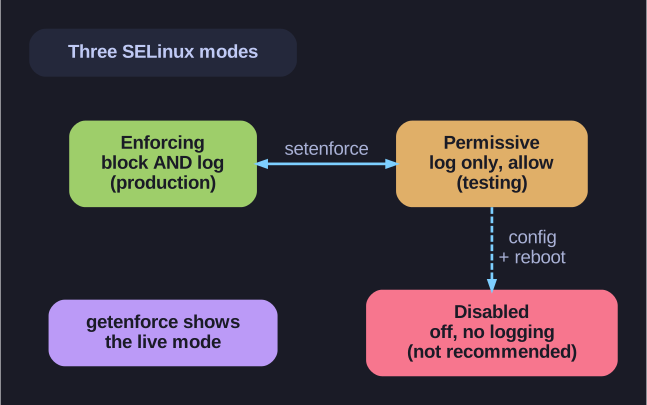
* The three SELinux modes — enforcing (block+log), permissive (log only), disabled (off). *
The key distinction is enforcing vs permissive: both still evaluate the policy and write the same AVC denial messages to the audit log, but only enforcing actually stops the action. That makes permissive the right tool for debugging — you can see every rule a workload would hit without breaking it, fix the labels/booleans, then switch back to enforcing. Check the live mode with getenforce; flip it at runtime with setenforce 0 (permissive) / setenforce 1 (enforcing). Note you cannot reach disabled with setenforce — going fully off requires editing the config file and rebooting.
| Mode | Behavior | Use Case |
|---|---|---|
| Enforcing | Enforces access control rules, denies violations | Production systems (default) |
| Permissive | Logs violations but doesn't block | Testing & troubleshooting |
| Disabled | Completely off, no logging | Not recommended! |
Check current mode:
getenforce
Change mode temporarily:
# Permissive
setenforce 0
# Enforcing
setenforce 1
Set mode at boot (kernel parameter):
# Permissive
enforcing=0
# Enforcing
enforcing=1
Tip: Never disable SELinux in production - use Permissive mode for troubleshooting instead.
Go deeper:
 getenforce(8) — the command that reports enforcing / permissive / disabled.