Quiz Entry - updated: 2026.07.30
What are the two primary command modes in Cisco IOS, and how do you identify each by the prompt?
User EXEC (basic monitoring, prompt ends in >) and Privileged EXEC (full access, prompt ends in #); use enable to go from one to the other.
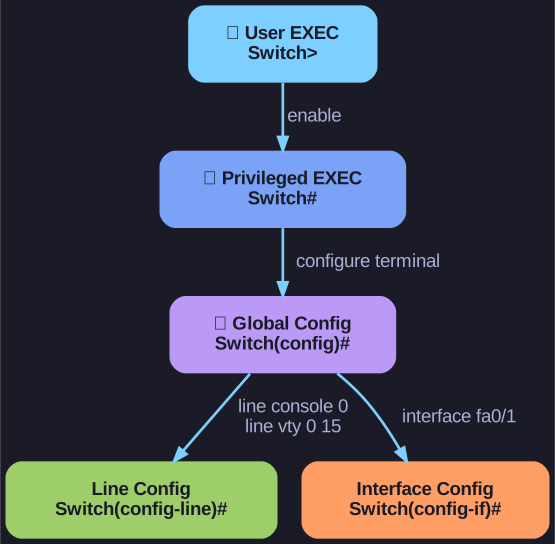
* The IOS mode hierarchy: each step down unlocks more scope; the prompt tells you where you are. *
| Mode | Access Level | Prompt |
|---|---|---|
| User EXEC Mode | Limited number of basic monitoring commands only | Switch> or Router> (ends with >) |
| Privileged EXEC Mode | Access to all commands and features | Switch# or Router# (ends with #) |
Use the enable command to move from User EXEC to Privileged EXEC mode.
Go deeper:
 Cisco IOS — command modes (Wikipedia) — User EXEC, Privileged EXEC, Global Config and the 100+ sub-modes, identified by their prompts.
 Jeremy's IT Lab — Intro to the CLI (CCNA Day 4) — walks through moving between EXEC modes live.