Quiz Entry - updated: 2026.07.30
What commands are needed to configure a router interface with IPv4 and IPv6 addresses?
Enter the interface, add a description, assign ip address (IPv4) and ipv6 address (IPv6), then no shutdown — router interfaces are administratively down until you enable them.
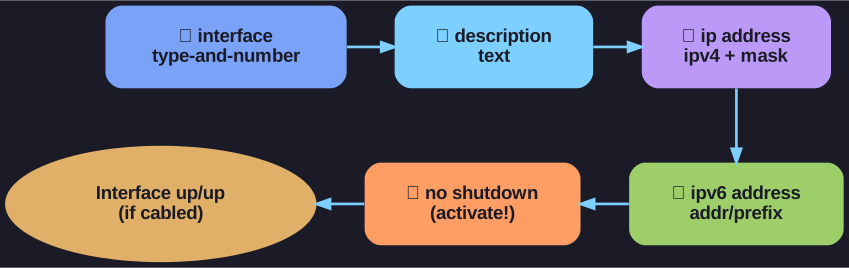
* The five-command pattern per interface; no shutdown is the critical last step — router interfaces are administratively down by default. *
Router Interface Configuration Commands:
Router(config)# interface type-and-number
Router(config-if)# description description-text
Router(config-if)# ip address ipv4-address subnet-mask
Router(config-if)# ipv6 address ipv6-address/prefix-length
Router(config-if)# no shutdown
Key points:
| Command | Purpose |
|---|---|
interface g0/0/0 |
Enter interface configuration mode |
description |
Document the interface purpose (best practice) |
ip address |
Assign IPv4 address and subnet mask |
ipv6 address |
Assign IPv6 address and prefix |
no shutdown |
Activate the interface (critical - interfaces are shutdown by default!) |
Important: Unlike switches, router interfaces are administratively down by default. You MUST use no shutdown to enable them.
Go deeper:
 Router (computing) — interfaces (Wikipedia) — what a routed interface is and why each needs its own L3 address.
- IPv6 (Wikipedia) — the 128-bit address and prefix-length format used by the
ipv6 addresscommand.