Quiz Entry - updated: 2026.08.27
What do the 'C' and 'L' codes mean in the output of show ip route?
C marks a directly connected network (the whole subnet); L marks the local /32 host route for the router's own interface address.
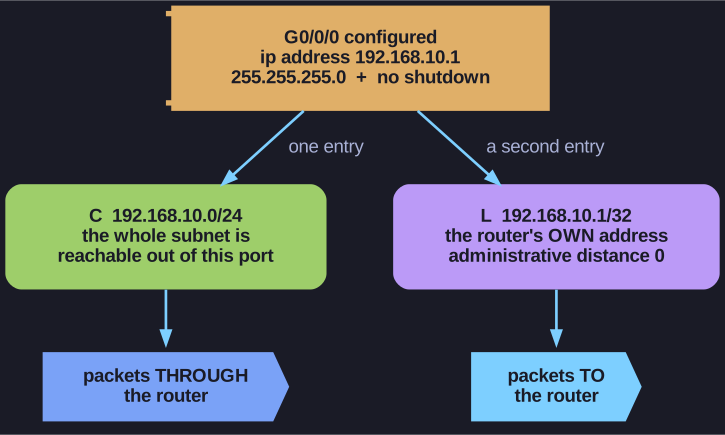
* One configured interface, two entries in the routing table. *
R1# show ip route
C   192.168.10.0/24 is directly connected, GigabitEthernet0/0/0
L   192.168.10.1/32 is directly connected, GigabitEthernet0/0/0
C   192.168.11.0/24 is directly connected, GigabitEthernet0/0/1
L   192.168.11.1/32 is directly connected, GigabitEthernet0/0/1
Understanding the two entries per interface:
| Code | Example | Subnet Mask | Purpose |
|---|---|---|---|
| C (Connected) | 192.168.10.0/24 | Network mask | Tells the router "this entire network is reachable through this interface" |
| L (Local) | 192.168.10.1/32 | /32 (host route) | The router's own IP (Internet Protocol) — used to process packets addressed directly to the router |
For IPv6, the same pattern applies:
- C route with /64 prefix for the connected network
- L route with /128 prefix for the router's own address
Key point: The L (Local) route has an AD (Administrative Distance) of 0 — the highest possible priority. This ensures the router can always process packets sent to its own interfaces.
Tip: In older IOS versions (before IOS 15), only the C entry appeared. The L entry was added to improve the router's efficiency in handling packets destined to itself.
Go deeper:
 Administrative distance (Wikipedia) — the AD 0 the local (L) route carries, giving it top priority.
- Routing table (Wikipedia) — directly-connected routes and how the router uses the table for longest-prefix forwarding.