Quiz Entry - updated: 2026.07.30
What happens when a port enters err-disabled state, and how do you recover it?
An err-disabled port is completely shut down — no traffic is sent or received, and the port LED is off. To recover, you must manually shut down and re-enable the port, or configure automatic recovery.
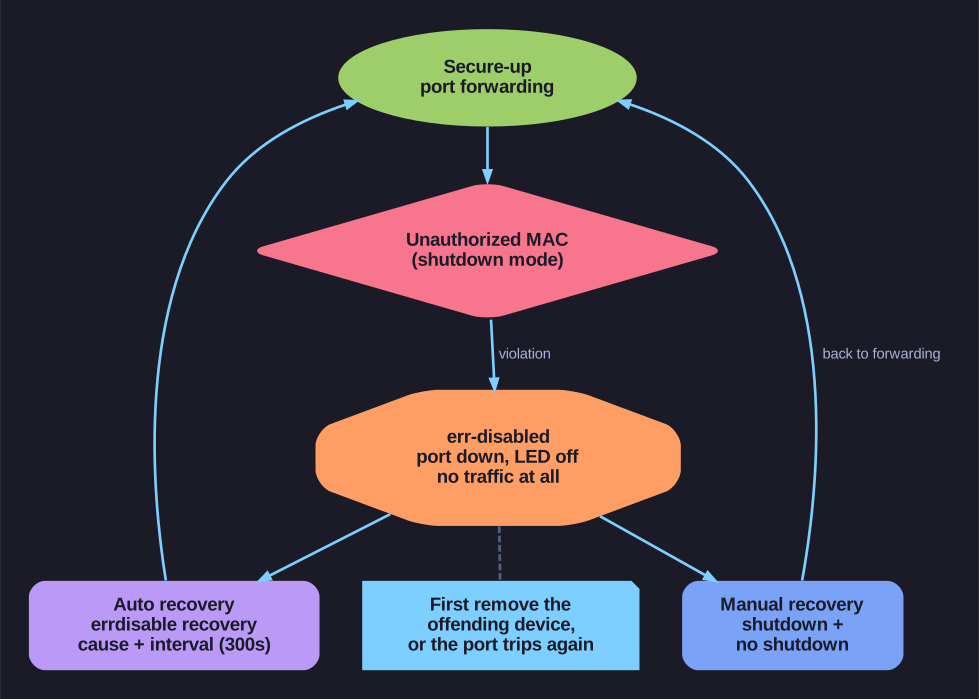
* The err-disabled lifecycle and its two recovery paths. *
What err-disabled looks like:
%PM-4-ERR_DISABLE: psecure-violation error detected on Fa0/1, putting Fa0/1 in
err-disabled state
%LINK-5-CHANGED: Interface FastEthernet0/1, changed state to down
Manual recovery:
Switch(config)# interface FastEthernet 0/1
Switch(config-if)# shutdown
Switch(config-if)# no shutdown
You must issue shutdown first, then no shutdown. Just issuing no shutdown alone won't work — the port needs to be cycled.
Automatic recovery (errdisable recovery):
Switch(config)# errdisable recovery cause psecure-violation
Switch(config)# errdisable recovery interval 300    ! 300 seconds = 5 minutes
- The port automatically recovers after the configured interval
- Default interval is 300 seconds (5 minutes)
- Useful in environments where false positives might occur (e.g., a user plugging in a second device temporarily)
Before recovering, fix the problem:
- If the violation was from an unauthorized device → remove it
- If it was a legitimate device → either increase the maximum MACs or add the device's MAC to the secure list
- Otherwise, the port will just go err-disabled again immediately after recovery
Go deeper:
 Port Security (Study-CCNA) — the err-disabled state from a violation and the
 shutdown/no shutdownrecovery.