What happens when you run a program like ./p24 5?
Three phases: the shell reads the command, the program is loaded from disk into memory, then the CPU executes its instructions.
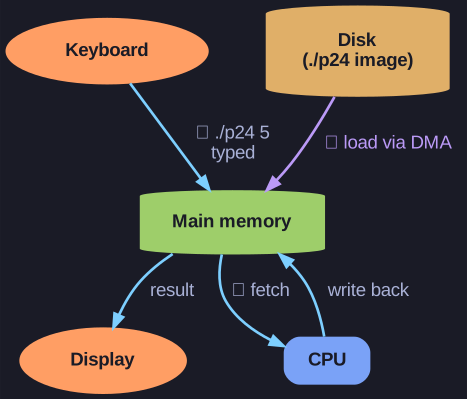
* Running a program moves data from keyboard to memory, loads the image from disk via DMA, then cycles through the CPU and out to the display. *
These phases trace one full trip of data through the machine — from the keyboard, into memory, through the CPU, and back out to the display — which is why this tiny example touches every major component of the system.
Phase 1: Reading command
- Shell reads keyboard input character by character into memory
<Enter>signals end of command
Phase 2: Loading program
- Shell searches for file
p24in current directory - Loads executable code and data from disk into main memory
- Uses DMA (Direct Memory Access) - disk controller transfers directly to memory
Phase 3: Execution
- CPU executes machine instructions from memory
- Reads data, performs calculations
- Sends output to display via graphics adapter
In the classic p24 example the program fills an array with A[i] = 1024 - i and prints the element whose index is the command-line argument, so ./p24 5 prints A[5]=1019 to the screen.
Data flow: Keyboard -> Memory -> CPU -> Memory -> Display
Go deeper:
 Loader (computing) (Wikipedia) — the OS step (execve) that maps the executable off disk into memory, sets registers, and jumps to entry.
- Process (computing) (Wikipedia) — how the passive on-disk program becomes a live process in memory scheduled onto the CPU.