What is a process and how does context-switching work?
A process is the OS's abstraction of a running program; rapidly saving one process's state and loading another's (a context switch) fakes parallelism on one core.
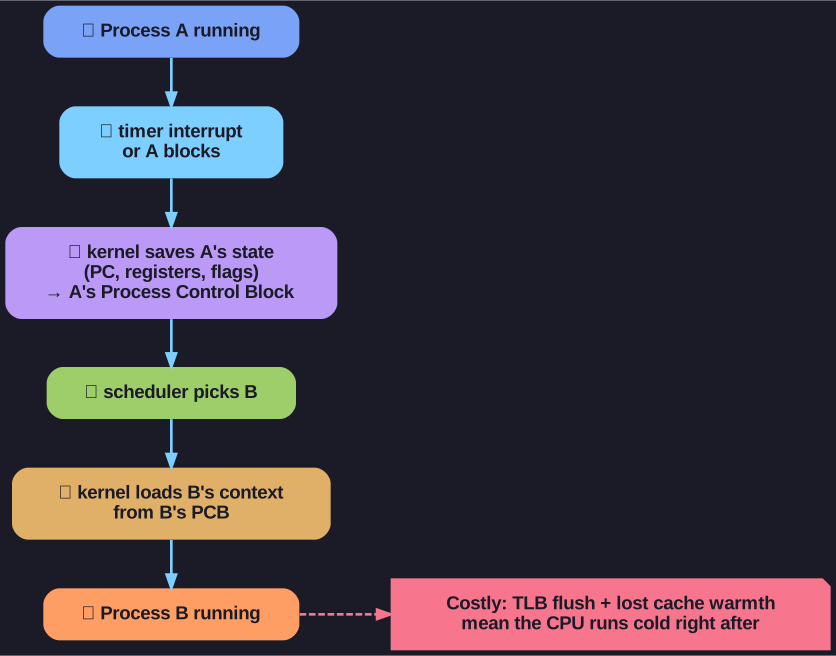
* A context switch saves the running process's state to its control block and restores another's, an operation made costly by TLB flushes and lost cache warmth. *
Each process gets its own address space and the illusion of owning the machine. On a single core the OS interleaves them so quickly that they appear to run at once, switching whenever a timer fires or a process blocks waiting on I/O.
Process = running program with:
- Its own address space
- Illusion of exclusive hardware access
Concurrency types:
- Multi-core: True parallelism (multiple CPUs)
- Single-core: Apparent parallelism via context-switching
Context = everything needed to resume:
- Program Counter (PC)
- Register file contents
- Memory contents
- Open files
Context switch triggers:
- Periodically (timer interrupt)
- When process waits (I/O, sleep)
Threads: Lightweight processes sharing address space - easier data sharing, more efficient scheduling.
Go deeper:
 Context switch (Wikipedia) — saving one process/thread's state and restoring another's, plus what triggers it.
- Process (computing) (Wikipedia) — what a process is and its running/ready/blocked lifecycle.
- Thread (computing) (Wikipedia) — threads share a process's address space, so switching between them is cheaper.