Quiz Entry - updated: 2026.07.30
What is a Switch Virtual Interface (SVI), why is it needed, and what is the default SVI?
An SVI is a virtual VLAN interface you give an IP address so you can remotely manage a Layer 2 switch — its physical ports can't hold IPs. The default is VLAN 1, and the switch needs no IP at all to actually switch traffic.
A Layer 2 switch has physical ports for connecting devices, but those ports do not support Layer 3 (IP) addresses. To manage the switch remotely you instead configure a Switch Virtual Interface (SVI) — a virtual interface tied to a VLAN that can hold an IP address.
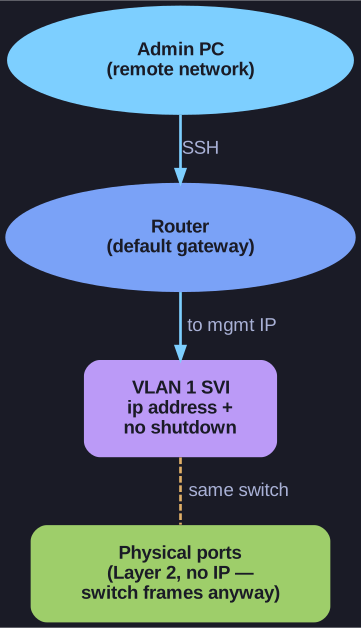
* The SVI holds the only IP a Layer 2 switch needs — purely for remote management; the data ports switch frames without one. *
Key facts:
- Every switch has a default VLAN 1 SVI, typically used for management access
- The SVI IP is only for remote management — a switch does not need an IP address to forward frames
Configuration:
Switch(config)# interface vlan 1
Switch(config-if)# ip address 192.168.1.20 255.255.255.0
Switch(config-if)# no shutdown
Go deeper:
 Network switch — management (Wikipedia) — how a managed Layer 2 switch is administered via an IP, while forwarding frames without one.
- Default gateway (Wikipedia) — what the SVI also needs so management traffic can leave the local network.