What is a terminal emulator?
A terminal emulator is a GUI program that draws a fake text terminal in a window — the thing you actually open when you "open the terminal" on a desktop.
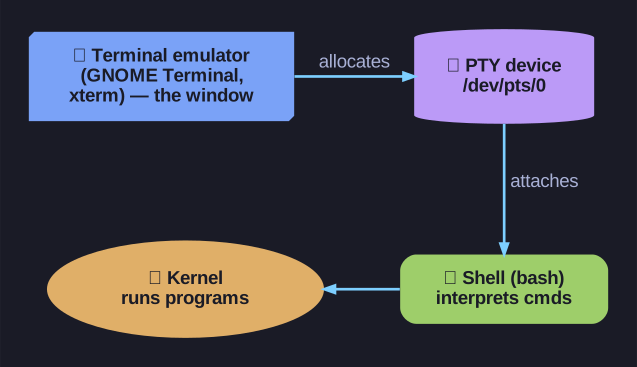
* The three loosely-used layers made concrete: the emulator is the window, the PTY is the device it allocates, the shell is what runs inside it. *
The old physical terminals are gone, but tons of software still expects to talk to one. A terminal emulator bridges that gap: it pretends to be a hardware terminal so a shell running inside it behaves exactly as it would on a real console — same Ctrl+C, same line editing — except now it's a resizable, copy-pasteable window on your desktop.
| Emulator | Environment |
|---|---|
| GNOME Terminal | GNOME desktop |
| Konsole | KDE desktop |
| xterm | The classic X Window System terminal |
| Windows Terminal | Windows |
| iTerm2 | macOS |
Under the hood it does three things: open a window, allocate a pseudo-terminal (PTY) from the kernel, and start a shell (e.g. bash) attached to that PTY. That PTY is exactly why your terminal session shows up as /dev/pts/0 rather than a real tty.
Practical wins over a raw text console: multiple tabs/windows at once, mouse copy-paste, scrollback, and custom fonts/colours — all while the graphical desktop keeps running alongside.
Gotcha: "terminal," "shell," and "terminal emulator" get used loosely but are three layers: the terminal emulator is the window, the terminal (PTY) is the device it provides, and the shell (bash) is the program running inside that interprets your commands.
Go deeper:
 pty(7) — Linux manual page — the PTY a terminal emulator allocates so a shell behaves as if on real terminal hardware.