Quiz Entry - updated: 2026.07.30
What is a VLAN trunk, and why is it needed in a multi-switch environment?
A trunk is a point-to-point Layer 2 link between two network devices (typically switches) that carries traffic for multiple VLANs (Virtual Local Area Networks) simultaneously.
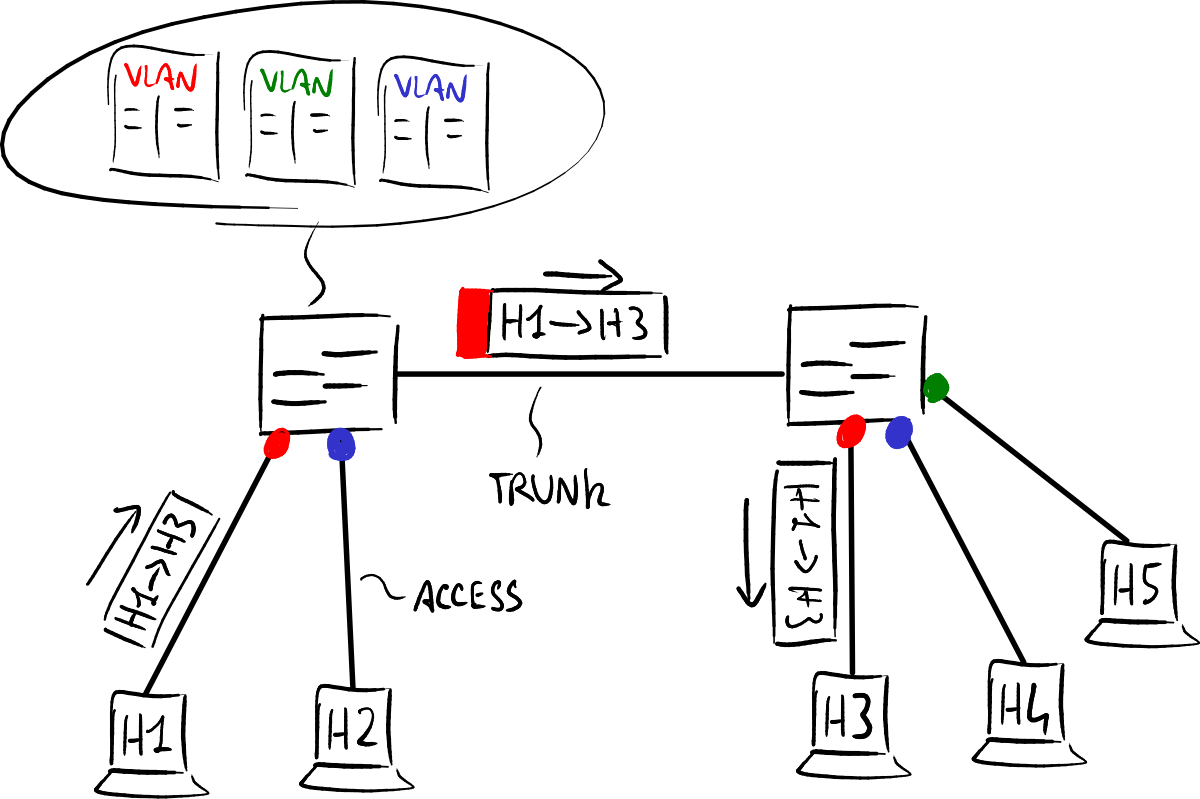
One trunk link multiplexes many VLANs. — Luca Ghio, CC BY-SA 4.0, via Wikimedia Commons.
Without trunks, you'd need a separate physical cable between switches for each VLAN — completely impractical. A single trunk link multiplexes all VLAN traffic over one connection using 802.1Q tagging.
Trunk characteristics:
- Carries traffic for all VLANs by default (can be restricted)
- Extends VLANs across the entire network — a device on VLAN 20 on Switch A can reach a device on VLAN 20 on Switch B
- Uses IEEE 802.1Q encapsulation to identify which VLAN each frame belongs to
- Typically configured on switch-to-switch and switch-to-router links
Key distinction:
- Access port — belongs to exactly ONE VLAN, connects to end devices (PCs, printers)
- Trunk port — carries MULTIPLE VLANs, connects to other switches or routers
Tip: Think of a trunk like a multi-lane highway where each lane is a different VLAN, vs. an access port which is a single road to one destination.
Go deeper:
 VLANs Explained (PracticalNetworking) — clear walkthrough of access vs. trunk ports and why one tagged link carries many VLANs, with diagrams and a real 802.1Q capture.
 IEEE 802.1Q (Wikipedia) — the tagging standard a trunk uses to multiplex many VLANs over one link.