What is an inode in Linux?
An inode ("index node") is the on-disk record holding everything about a file except its name and its contents — permissions, owner, size, timestamps, and pointers to where the data actually lives.
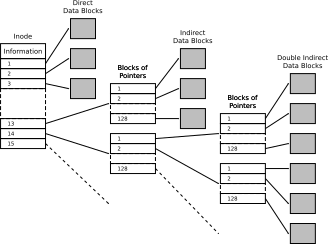
* An ext2 inode: metadata plus pointers to the data blocks — the filename lives in the directory, not the inode. — Timtjtim, CC BY-SA 4.0, via Wikimedia Commons. *
The big surprise for newcomers is that the filename is not part of the file. Linux splits a file into three layers, and the inode is the hub in the middle:
filename (in a directory) → inode (metadata + block pointers) → data blocks (contents)
A directory is really just a table mapping names to inode numbers. The inode holds the metadata and points to the data. This separation is exactly what makes hard links possible: two names in two directory tables can point at the same inode, so they're the same file under different names — neither is the "real" one.
What's inside an inode: file type and permissions, owner UID/GID, size, the three timestamps (access/modify/change), a link count, and pointers to the data blocks. What's not inside: the filename and the contents.
ls -i file.txt   # show this file's inode number
stat file.txt    # full inode details (perms, owner, times, links)
df -i            # inode usage per filesystem
Gotcha: a filesystem has a fixed number of inodes set when it's created. You can run out of inodes while still having free disk space — millions of tiny files exhaust inodes long before they fill the bytes. Symptom: "No space left on device" even though df -h shows room; check df -i to confirm.
Go deeper:
 inode(7) — Linux manual page — exactly what an inode stores: type, permissions, owner, timestamps, link count, block pointers.