Quiz Entry - updated: 2026.08.27
What is auto-MDIX and why is it useful?
Auto-MDIX (Automatic Medium-Dependent Interface Crossover) detects whether a straight-through or crossover cable is plugged in and flips the port's internal wiring to match — so either cable works.
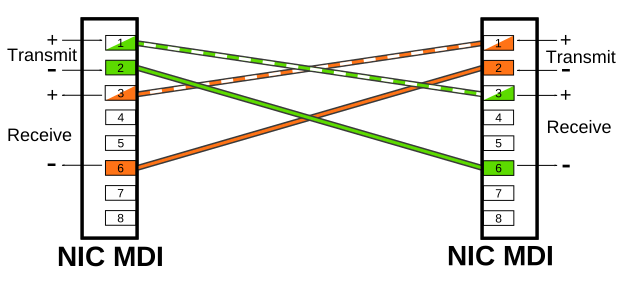
* Crossover wiring that auto-MDIX makes unnecessary. — W Nowicki, CC BY-SA 3.0, via Wikimedia Commons. *
Without auto-MDIX, you must use the correct cable type:
- Straight-through: Switch to PC, server, router
- Crossover: Switch to switch, switch to repeater
With auto-MDIX, either cable type works — the interface automatically adjusts the internal wiring.
Configuration:
S1(config-if)# mdix auto
Requirements for auto-MDIX:
- Interface speed and duplex must be set to auto (both must be auto for auto-MDIX to work correctly)
- Enabled by default on Catalyst 2960 and 3560
- Not available on older Catalyst 2950 and 3550
Verify auto-MDIX status:
S1# show controllers ethernet-controller phy | include Auto-MDIX
Tip: In modern networks, auto-MDIX means you rarely need to worry about straight-through vs. crossover cables. But on older equipment, cable type still matters.
Go deeper:
 Medium-dependent interface (Wikipedia) — the "Automatic MDI-X" section explains automatic crossover detection, eliminating crossover cables.