What is browser fingerprinting, and what categories of attributes make a browser uniquely identifiable?
Browser fingerprinting identifies a device by the unique combination of its software, hardware, and configuration — with no cookies or stored state required.
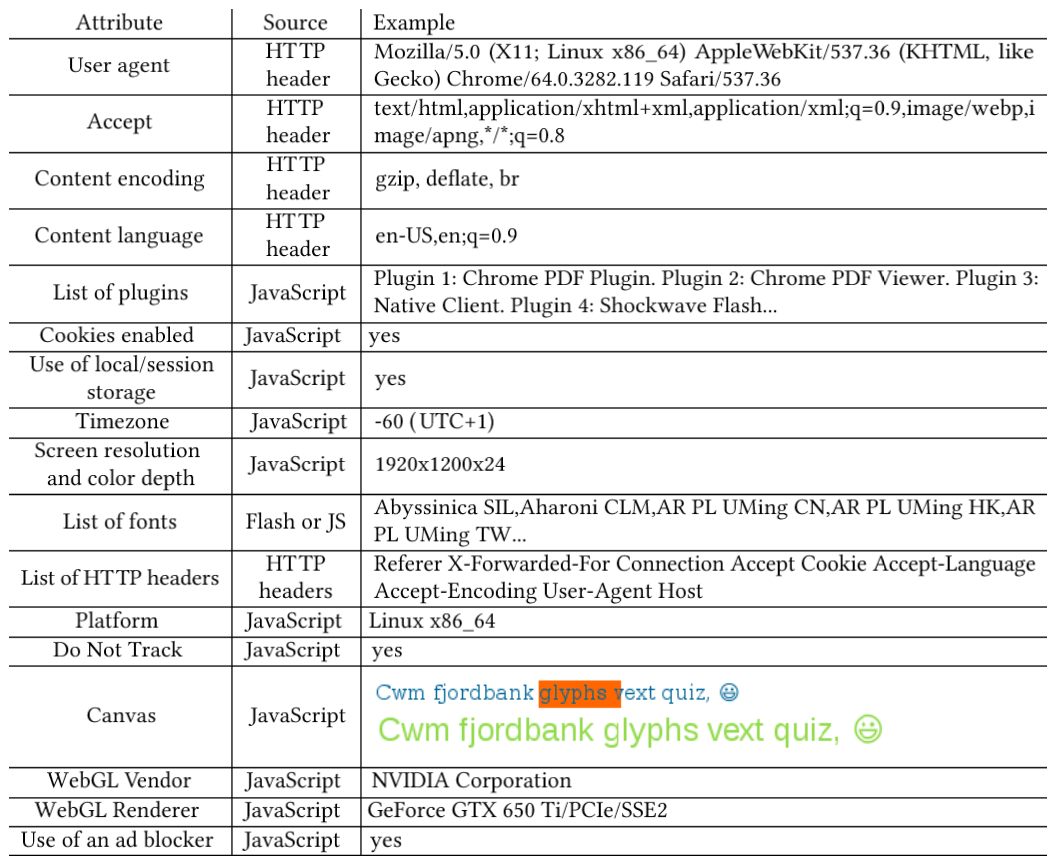
* Attributes that combine into a browser fingerprint. — Laperdrix et al., CC BY 4.0, via Wikimedia Commons. *
Three attribute categories:
| Category | Examples |
|---|---|
| Software & OS | User-Agent string (browser, OS, architecture), HTTP Accept headers (languages, encodings), plugins |
| Hardware & display | Screen resolution & color depth, multi-monitor setup, pixel density |
| System configuration | Installed fonts, timezone & locale, cookie settings, supercookie resistance |
No single attribute identifies you — but the combination is often unique among millions of users. Because it relies on passively observable properties, fingerprinting is stateless: there's nothing to delete, and incognito mode doesn't help.
Tip: Test your own browser's uniqueness with EFF's Cover Your Tracks or the WebKay demo, which visualizes how much your browser reveals.
Go deeper:
 Device fingerprint (Wikipedia) — the attribute categories, entropy and stateless-tracking nature.
 EFF Cover Your Tracks — live test of how unique and trackable your browser fingerprint is.