What is crontab and how does the cron time format work?
A crontab runs jobs on a recurring schedule; each line is five time fields — minute, hour, day-of-month, month, weekday — followed by the command.
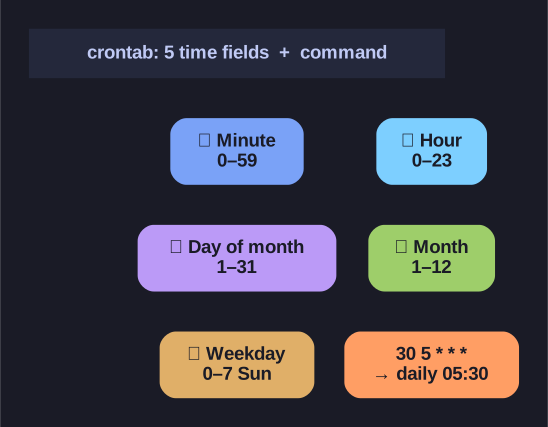
* The five cron time fields, left to right, plus a worked example. *
Read the five fields left to right, smallest unit first: MIN HOUR DAY MONTH WEEKDAY. A * means "every" value for that field, so 30 5 * * * = "at minute 30 of hour 5, every day." The shorthands make patterns concise: */5 = "every 5th," 1-5 = a range, 1,3,5 = a list. Edit your personal crontab with crontab -e (never edit the file by hand).
MIN HOUR DAY MONTH WEEKDAY command
| Field | Values | Special |
|---|---|---|
| Minute | 0-59 | |
| Hour | 0-23 | |
| Day | 1-31 | |
| Month | 1-12 | |
| Weekday | 0-7 (0,7=Sun) | |
* |
Any value | |
*/n |
Every n | |
n,m |
List | |
n-m |
Range |
Examples:
# Every day at 5:30 AM
30 5 * * * /path/to/script.sh

# Every Monday at 9 AM
0 9 * * 1 /path/to/script.sh

# Every 5 minutes
*/5 * * * * /path/to/script.sh

# Every hour from 9-17 on weekdays
0 9-17 * * 1-5 /path/to/script.sh
Crontab commands:
| Command | Purpose |
|---|---|
crontab -l |
List your crontab |
crontab -e |
Edit your crontab |
crontab -r |
Remove your crontab (careful — no confirmation!) |
Gotcha: when both the day-of-month and weekday fields are restricted (neither is *), cron runs the job if either matches, not both. And cron runs with a minimal PATH, so use absolute paths to commands or the job may silently fail.
Go deeper:
 crontab(5) man page (man7.org) — the five time fields and the day-of-month/day-of-week OR gotcha.
- Cron — Wikipedia — cron syntax, special strings, and history.