What is DHCP, and what are the four phases of its DORA process?
DHCP automatically assigns IP addresses (and gateway, DNS, subnet mask) to devices joining a network. The four-step process is Discover, Offer, Request, Acknowledge.
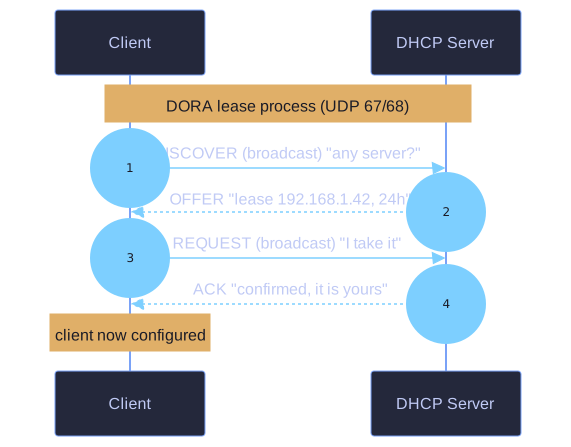
* The DORA exchange that leases a client its IP. *
The DORA exchange:
1. DISCOVER  Client → Server (broadcast)
   "Hey, any DHCP server out there? I need an IP."

2. OFFER     Server → Client
   "I'll lease you 192.168.1.42 for 24 hours, with these settings."

3. REQUEST   Client → Server (broadcast)
   "I'll take it! (Other servers: I'm declining your offers.)"

4. ACK       Server → Client
   "Confirmed. 192.168.1.42 is yours until tomorrow."
Why broadcast at first:
Step 1 (Discover) and Step 3 (Request) are broadcasts because:
- Client doesn't know the DHCP server's IP yet
- There may be multiple DHCP servers; broadcast lets all hear the rejection in step 3
What gets assigned:
| Setting | Example |
|---|---|
| IP address | 192.168.1.42 |
| Subnet mask | 255.255.255.0 |
| Default gateway | 192.168.1.1 |
| DNS servers | 8.8.8.8, 1.1.1.1 |
| Lease time | 86400 seconds (24h) |
| Domain name | example.local |
Lease renewal:
Halfway through the lease (T1, ~50%), the client sends a REQUEST directly to the server (no Discover) to renew. If that fails, at T2 (~87.5%) it broadcasts again.
Commands:
ipconfig /release       # Give back the lease
ipconfig /renew         # Request a new (or same) lease
ipconfig /all           # Show full DHCP info
Tip: When you reboot and "everything works," that's DHCP. When you connect to a hotel WiFi and need to wait 5 seconds before browsing — that's DORA happening. Watch it in Wireshark with filter dhcp for the full education.
Go deeper:
 Dynamic Host Configuration Protocol (Wikipedia) — each DORA phase with packet diagrams, plus lease renewal (T1/T2) and relay agents.