What is extended traceroute on Cisco IOS, and how does Windows tracert differ from IOS/Linux traceroute at the protocol level?
Extended traceroute is entered by typing traceroute with no destination in privileged EXEC mode, then answering prompts to tune parameters; Windows tracert uses ICMP Echo Requests, while IOS and Linux use UDP with an invalid port number.
Traceroute maps the hops to a destination by sending probes with deliberately small Time To Live (TTL) values — TTL 1 expires at the first router (which replies with an ICMP time-exceeded message), TTL 2 at the second, and so on — so each step reveals one more router along the path. Extended traceroute on Cisco IOS is the interactive version: typing traceroute with no destination in privileged EXEC mode makes IOS prompt you for parameters (such as probe count, timeout, and source interface), with Enter accepting each default, which is handy for tracing from a specific source or tuning timeouts. The protocol difference is the practical catch: Windows tracert sends ICMP Echo Requests, whereas IOS and Linux traceroute send UDP datagrams to an invalid port (the final host then answers with an ICMP "port unreachable"). That means a firewall blocking one protocol but not the other can make the same path succeed from one operating system and fail from another.
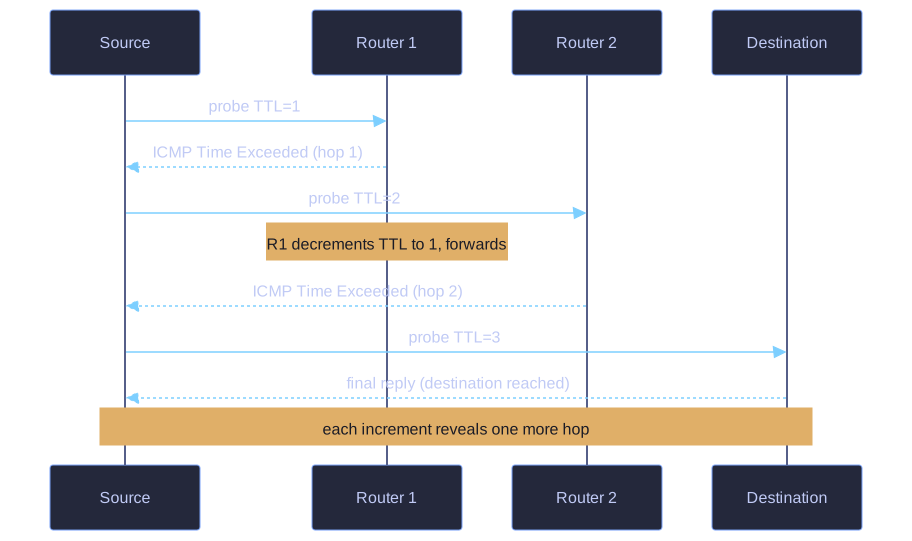
* Each probe's TTL is one larger; the router where it expires returns ICMP Time Exceeded, revealing that hop. *
Extended Traceroute:
- Like extended ping, the IOS extended traceroute lets the administrator adjust parameters of the trace.
- Enter it in privileged EXEC mode by typing
traceroutewithout a destination IP address; IOS then guides you through prompts (pressing Enter accepts the default). - The Windows
tracertcommand accepts parameters as command-line options but is not interactively guided like the IOS version.
Protocol differences:
| Implementation | Probe used |
|---|---|
Windows tracert |
ICMP Echo Requests |
Cisco IOS / Linux traceroute |
UDP datagrams with an invalid port number; the final host returns an ICMP port unreachable message |
Interrupt: Ctrl-C in Windows, Ctrl-Shift-6 in Cisco IOS.
Key insight: The ICMP-vs-UDP difference matters when a firewall blocks one protocol but not the other — a trace may succeed from one OS and fail from another even though the path is the same.
Go deeper:
 Wikipedia — Traceroute — the TTL/time-exceeded mechanism plus the UDP-vs-ICMP probe difference between OSes.
- Network Direction — ICMP for IPv4 — the time-exceeded message traceroute relies on, in context with the rest of ICMP.