What is LVM and what problem does it solve?
LVM (Logical Volume Manager) is an abstraction layer between physical disks and filesystems that lets you resize, combine, and snapshot storage without being locked into fixed partition boundaries.
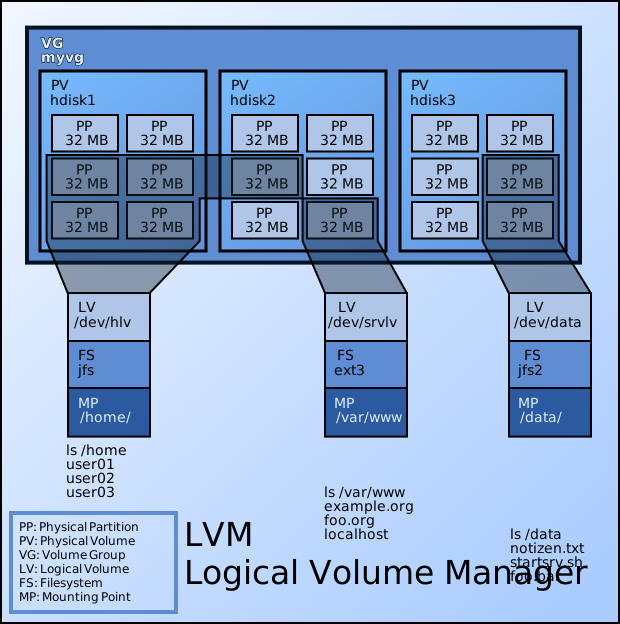
* LVM's layering — physical volumes pool into a volume group from which logical volumes are carved. — Emanuel Duss, CC BY-SA 3.0 / GFDL, via Wikimedia Commons. *
A traditional partition is rigid: its size and position on the disk are fixed at creation. Run out of room on /var and you're stuck — there's no easy way to steal space from a neighbouring partition. LVM breaks that rigidity by inserting a flexible layer in between, so the filesystem no longer sits directly on a physical partition but on a logical volume the system can reshape on demand.
What that buys you:
- Resize on the fly — grow (and, for some filesystems, shrink) volumes while they're mounted and in use.
- Span multiple disks — pool several physical drives into one big volume, so a filesystem can be larger than any single disk.
- Live expansion — plug in a new disk and add its space to an existing volume without downtime or repartitioning.
- Snapshots — capture a point-in-time copy of a volume (handy for consistent backups or a safe rollback point before a risky change).
Mental model: LVM hides the messy physical layout from applications. They see a clean logical volume; LVM quietly maps that onto whatever disks and extents are available underneath. The same concept exists elsewhere — Windows "Dynamic Disks", macOS CoreStorage, AIX and HP-UX volume managers — but on Linux it's been the standard since 1999.
Go deeper:
 Logical Volume Manager (Linux) — Wikipedia — LVM's flexibility goals (resize, span, snapshot) and history.
- lvm(8) man page — the canonical LVM toolset reference.