Quiz Entry - updated: 2026.07.30
What is NAT on a wireless router, and what is port forwarding?
NAT (Network Address Translation) translates private LAN (Local Area Network) IP (Internet Protocol) addresses to the public IP assigned by the ISP, enabling internet access for all LAN devices through a single public IP. Port forwarding opens specific ports to allow inbound connections to reach a specific internal device.
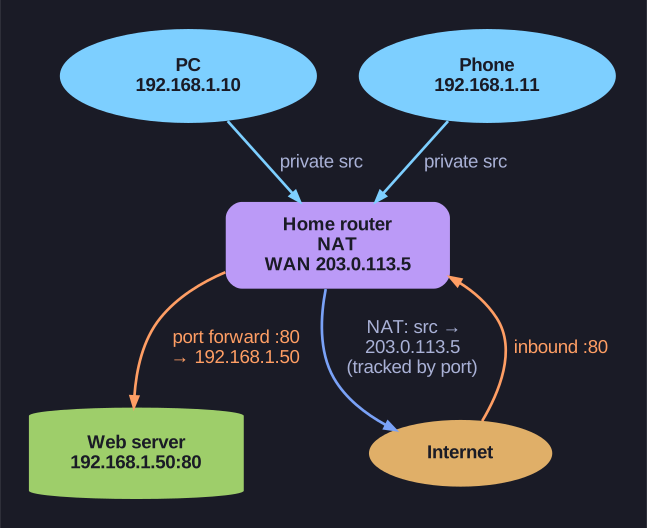
* NAT shares one IP; port forwarding maps inbound ports. *
NAT (Network Address Translation):
- The ISP assigns one public IP to the router's WAN interface
- All LAN devices use private IPs (e.g., 192.168.1.x)
- NAT translates outbound traffic: replaces the private source IP with the public IP
- Tracks sessions using source port numbers so return traffic reaches the correct device
- Result: Many devices share one public IP
Port Forwarding:
- By default, the router blocks all unsolicited inbound traffic — NAT acts as a basic firewall
- Port forwarding creates an exception: "any traffic arriving on port X → forward to internal device Y"
- Use cases: Hosting a web server (port 80/443), game server, security cameras, remote desktop
Port Triggering vs Port Forwarding:
- Port forwarding: Permanent rule — always forwards the specified port to the internal device
- Port triggering: Temporary — only opens the inbound port when an outbound connection on a specified port is detected. More secure because the port isn't always open
IPv6 note: If the ISP provides IPv6, each device can get its own globally unique IPv6 address — NAT is no longer needed for address sharing (though IPv6 firewalling is still important).
Go deeper:
 Network address translation (Wikipedia) — private↔public translation and PAT/NAPT on home routers.
- Port forwarding (Wikipedia) — mapping an external port to an internal host, with residential examples.