What is NetworkManager and how does nmcli interact with it?
NetworkManager is the daemon that owns network config; nmcli is its command-line client, structured as nmcli <object> <command> over connections and devices.
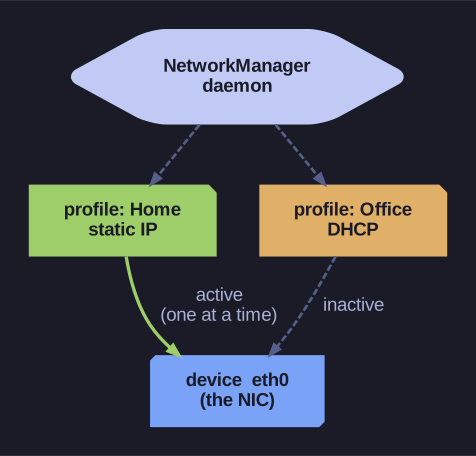
* NetworkManager separates connections (saved profiles) from devices (the NIC) — a device can hold several profiles but only one is active at a time. *
The key model is connection vs device. A device is the actual interface (eth0). A connection is a saved profile of settings (static IP, DNS, autoconnect…). One device can have several profiles — e.g. a "home" and an "office" profile for the same laptop NIC — but only one is active per device at a time. NetworkManager applies a profile to a device; nmcli is how you do that from the shell.
nmcli command structure:
nmcli [object] [command] [arguments]
Common objects:
| Object | Purpose |
|---|---|
con (connection) |
Manage connection profiles |
dev (device) |
Manage network devices |
general |
General NetworkManager status |
Examples:
nmcli con show                    # List connections
nmcli con up "Wired connection 1" # Activate connection
nmcli dev status                  # List devices